Category Archives: Web 2.0

Web 2.0 supermarket – let’s go shopping!

There’s a veritable cornucopia of Web 2.0 goodies on this site. It’s the Web 2.0 comprehensive directory to a TON of social networking sites presented by Jake McAuley from GO2WEB20.net THE BOOK. This is version 2 updated 16/09/2008.

Here are some applications I thought might be useful just from the first few pages.

1K: Read and Write Short Stories
1000Keyboards is a website created for writers to submit, share, critique and communicate in an environment tuned to promote growth and exposure.
http://1000keyboards.com
Tags: share,create,communication

12 seconds : Share Short Videos
12seconds.tv allows friends and family to record and share short video updates about what they are doing or where they are. You can use a webcam or a cellphone. It’s a free, easy, and fun way to stay in touch.
http://12seconds.tv
Tags: video,TV,webcam,mobile

22 Books : Create and Share A List of your Favorite Books
22books is dedicated to the creating, sharing, and viewing of book lists. Start out by browsing some of the featured lists to the left and then open a free account and start creating lists of your own.
http://www.22books.com
Tags: book,share,list

280 slides : Create & Share Presentations Online
Create beautiful presentations, access them from anywhere, and share them with the world. With 280 Slides, there’s no software to download and nothing to pay for – and when you’re done building your presentation you can share it any way you like.
http://280slides.com
Tags: presentation,create,build

3D Package : 3D Box Maker
3d package is a 3d-box graphic generator. 3d package lets you instantly create 3d-boximages online, free. Just upload pictures for cover and sides and then get 3d-box in you favorite imageformat (JPG, GIF, PNG supported). Post them in your blog or anywhere else.
http://280slides.com
Tags: generator,3D,package

5min : Life Videopedia
5min is a place to find short video solutions for any practical question and a forum for people wanting to share their knowledge. 5min aims is to create the first communal Life Videopedia allowing users from all over the globe to contribute their knowledge by sharing visual guides covering variety of subjects.
http://www.5min.com/
Tags: knowledge,video,share,tool,Israel

99 Polls : Free Online Web Polls Generator
99Polls offers a simple approach to making Web Polls, which you can post nearly anywhere on the Web. 99Polls.com poll-creation tool requires no knowledge of HTML or coding, and once made, the poll can be posted on blogs, Web sites, and social-networking profiles such as: MySpace, Facebook, Bebo, Xanga and more…
http://www.99polls.com
Tags: poll,generator,social,Israel

All That : The Search that Never Stops
Allth.at will keep looking for your item on the sites you select and report new search results back to you. You can also choose to have new results emailed to you or, you can subscribe to the RSS feed and have your new search results delivered right to your RSS reader.
http://allth.at
Tags: search,engine,track

Alltop : All the Top Stories Covered all the Time
Alltop is a directory of stories from the most popular blogs on the Internet. Updated constantly.
http://alltop.com
Tags: content,link,aggregator

And I’m only selecting from the A list. This list will boggle your mind, distract you from the task at hand, and possibly ruin your relationships. Browse at own risk.


What can you do with a mobile phone and creativity?

This is what Jason van Genderen did:

[youtube=http://www.youtube.com/watch?v=ZrDxe9gK8Gk]

The 3 minute film cost $57 to make, was shot in New York and Sydney, and won first place at the New York Tropfest. Tropfest is the largest short film festival in the world, with the aim of bringing exposure to talented, young filmmakers from around New York and the world.

Can you imagine the fun and creativity for students with such a project?

Digital media is no longer an option – it’s a necessity

John Connell’s post ‘Literacy, Postliteracy, Modes of Expression….and a real Guitar Hero!’ raises the very important topic of digital literacies.  John Connell said that

the process of democratization of expression that is inherent in the development of the Web means that we now have available to us low-cost tools that allow us to express ourselves creatively in media that were previously unavailable to most because the barriers to entry were too high.

 Jenny Luca commented:

I recognise that my students respond to visual media today far more than they do print based.

In response to discussion about what constituted literacy, Hilery commented

A literate person can mediate his or her world by deliberately and flexibly orchestrating meaning from one linguistic knowledge base and apply or connect it to another knowledge base. The definition of literacy is dynamic, evolving, and reflects the continual changes in our society: not least the very real political challenges to the status…

(I love this definition, and wish that I could link to Hilery so I could read more of what she has to say).
Two very interesting things to ponder: what is literacy? and do we need to redefine it? (ok, two and a half);
and is digital literacy just an added dimension, or is it something more vital?
Jess from the United Kingdom put me onto a recent article by James Paul Gee and Michael H. Levine on Innovation Strategies for Learning in a Global Age.  The authors identify a newly emerging digital participation gap, and talk about competencies needed to succeed in a global age which can be developed through the ‘untapped power of interactive media’. The report also states that, apart from the reading gap between richer and poorer students, there is, more recently, another gap – between students who have mastered digital media and those who haven’t. Interesting to see these two problematic areas identified side by side, because both are needed to function competently in the 21st century. I’m sticking my neck out here but in Australia, at least, digital literacies are still way behind more traditional literacies; they’re seen in many cases as an extra dimension, and often as irrelevant in government schools which are not funded for functionality in an online world. In equipped schools, however, teachers’ training for technology remains limited, and they are often reluctant for trained teachers or teacher librarians to provide support. (There are several reasons for this, but I won’t go into them in this post). Or they’re unaware of the need for this support, eg. technology-based activities are unsupported and unscaffolded. The situation baffles me still. The article expresses this very eloquently:

Mastery of digital media for the production of knowledge constitutes a new family of “digital literacies,” since such media, like print before them, are tools for the production of meaning. For a student to fully leverage all the possibilities for learning and knowledge production to be found on the Internet, he or she must learn how to access, assess, and modify the plethora of information available. These skills don’t just develop on their own. They require mentoring and teaching, especially for children who come from families unable to provide this at home. So the digital gap is not just a matter of who has access to technology. More important, it is about who has access to well-designed learning systems and mentorship built around new digital technologies.

There’s so much that’s spot-on in this article. It cites digital media as naturally eliciting problem-solving behaviour and attitudes, and as enabling the solving of real-world problems. Fact is, as acknowledged in the article, we all know that young people’s digital involvement outside of school has been impressive:

In fact, children are already using digital environments and tools to join learning communities and become experts. Many use the Internet, communication media, digital tools, and membership in often virtual, sometimes real, communities of practice to develop technical expertise in different areas. These include video games, digital storytelling, fan fiction, music, graphic art, political commentary, robotics, anime, and nearly every other endeavor the human mind can think of. Their informal process of learning, collaboration, and transforming passion into knowledge is desperately needed in schools today.

Finally, there is the suggestion for a way forward: an indepth examination of the benefits of digital media; tech-savvy teachers training others; literacy assessments measuring problem-solving skills. Is there any research about the benefits of digital media – apart from well written articles? Because if there is, then we need to drag it out of the filing cabinet and bring it to the attention of educators and education specialists.

A picture’s worth a thousand words

I found ‘A picture’s worth’ on the Learning technology teacher development blog. it’s a wonderful collective version of people’s stories behind their own photos – even more interesting as a kaleidoscopic collection. Starting as a personal project, ‘A picture’s worth’ has developed into a pictorial record of varied experiences and reflections. Submissions of photos and text between 300 and 1000 words are moderated, and copyright for photos and essay remains with the author.

Some authors will include website links, and a map showing where the photo adds to the authenticity of the story. I like this idea for the classroom. Rather than write the usual story about a personal photo, students can showcase to a peer audience, and the shared stories could trigger ideas. It’s always interesting to see what subject matter is chosen and for what reason. Here’s an example of someone who loves photographing little forgotten theatres. Some of these stories are more intimate than others. Here’s an intimate, emotional one about a family coping with a dying grandmother. Here’s a confronting, brave one about abuse called ‘Bruised twice’.

The picture inserted in this post is of my church in Brunswick, Melbourne, on Merri Creek, although it could well be in Russia. This church building houses many stories, from its inception which remained a dream for many decades, including the efforts of many people, some of whom never saw the completed project, to the present day. And it will be connected to many different families and individuals in years to come.

The picture below is the inside of the church looking up at the cupol.

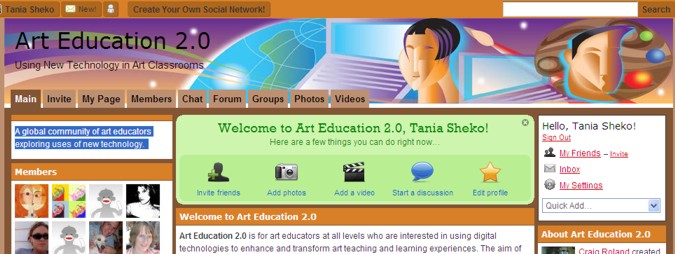
Art Education 2.0

Art Education 2.0 is a global community of art educators exploring uses of new technology.

Art Education 2.0 is for art educators at all levels who are interested in using digital technologies to enhance and transform art teaching and learning experiences. The aim of Art Education 2.0 is to explore ways of using technology to promote effective art education practices, encourage cultural exchanges and joint creative work, and support artistic projects, curricular activities, and professional development opportunities deemed important by our members.

When you sign up, you can avail yourself of all the usual socialnetworking options, for example, you can invite friends, upload photos or videos, or start a discussion. At a glance from the homepage you can see current projects, forum discussions and recent blog posts. The format is well organised and easy to read, eg. the post ‘Sir Ken Robinson & creative thinking’ , a post about Ken Robinson’s well-known TED talk, ‘Are schools killing creativity?’, is followed by several clearly displayed comments. I suppose, what I’m trying to say, is that it’s all there, and it’s easy and enjoyable to browse. A late night for me recently while I explored the blogroll – always dangerous to jump into hyperlinks, branching out evermore into oblivion.

New Web 2.0 resources in the right-hand navigation offer such delicacies as Andrew Douch’s video on the benefits of podcasting; Vizu, an interactive poll that can be added to a website or blog; 12 seconds, where you can record and share short videos about what you’re doing or where you are, etc.

On the left, there’s a chat option, featured websites, an option to share photos or videos, a section with a blog called ‘educational paradigms’, which includes posts such as ‘Keeping your teaching experiences fresh’, ArtsJournal , where you can check out daily art news, and more. You can also join groups, such as ‘first year art teachers’, or ‘Voicethread in the artroom’.

Digital art is popular with students, and teachers can get support for this by joining ‘Digital design’ . ‘Teaching animation’ supports teachers in a discussion of ideas, strategies, and tools for teaching animation.

I’ll definitely be telling my art faculty about this supportive art community. Makes me want to be an art educator!

Can intelligent literature survive in the digital age?

The Independent featured an article with this poignant question – can intelligent literature survive in the digital age? As the article says, ‘Is the paper-and-ink book heading the way of the papyrus scroll?’ This is indeed a question worth devoting more than a couple of minutes to.

The crucial question is – whether all our online reading – the fragmented, stylistically-challenged emails and microblogging – has taken its toll on our attention span? Nicholas Carr of ‘Is Google making us stupid?’ fame has added to the debate by claiming that the internet is responsible for his downward spiral in longterm concentration: ‘Once I was a scuba diver in the sea of words. Now I zip along the surface like a guy on a Jet Ski.’

Scott Karp, who writes a blog about online media, claims he used to be a voracious reader, but has now stopped reading books altogether. Is the internet to blame? Other people quoted in this article admit that they are now unable to concentrate on more than a couple of paragraphs at a time, and that they skim read, rather than read and think deeply.

A recently published study of online research habits , conducted by scholars from University College London’ claims the following:

‘It is clear that users are not reading online in the traditional sense; indeed there are signs that new forms of “reading” are emerging as users “power browse” horizontally through titles, contents pages and abstracts going for quick wins. It almost seems that they go online to avoid reading in the traditional sense.’ Still, the article does maintain that we are reading more now than when television was the preferred (only?) medium. Personally, I find it difficult not to skip around when links abound and I’m torn between too many tantalising directions.

Carr supports this behaviour with the following observation:
‘When the Net absorbs a medium, that medium is re-created in the Net’s image. It injects the medium’s content with hyperlinks, blinking ads, and other digital gewgaws, and it surrounds the content with the content of all the other media it has absorbed. A new e-mail message, for instance, may announce its arrival as we’re glancing over the latest headlines at a newspaper’s site. The result is to scatter our attention and diffuse our concentration.’

But is this fear of change typical of the fear each generation experiences?
‘In Plato’s Phaedrus, Socrates bemoaned the development of writing. He feared that, as people came to rely on the written word as a substitute for the knowledge they used to carry inside their heads, they would, in the words of one of the dialogue’s characters, “cease to exercise their memory and become forgetful.’ That may be so, but in today’s ‘information age’, it would be foolish to try to carry all the knowledge we read inside our heads, especially when access is so easy.

If the internet and Google are wired for quick knowledge-access, then surely, we realise that we don’t just read for knowledge. We read fiction, for example, as we regard art, to enter into a transformed, deeper(?) reality; to savour language and perceptions; to gain insight into the human condition; to gain moral, social and philosophical truths; to experience many things besides.
Are we losing/have we lost something in our move to 21st century literacies? Is it a matter of a lost language or genetic traces that will never be repaired? Even avid readers will necessarily read less traditional, hard-copy literature, if only because they are also keeping up with blogs, wikis and RSS feeds? Are we becoming ‘pancake people’, as the playwright, Richard Foreman, suggests?

Now, according to The Independent, many serious writers complain that challenging fiction doesn’t appeal – “difficult” novels don’t sell. To sell now, ‘books evidently need to be big on plot and incident, short on interior monologue.’ What are the consequences for teachers and librarians, trying to encourage young people to read? Are we trying to keep grandma alive? And besides, if we admit it, our own reading patterns are changing to some extent. And yet, websites that give exposure to books can only increase readership. Just think about all the literature you might be tempted to read after reading somebody’s passionate review or after searching Google Book Search.

If only you had the time or could get off the internet!

Back to Wordle

Further to my previous posts about Wordle (here, here, and here), I discovered in Box of Tricks excellent uses of Wordle by different teachers. One teacher used Wordle for a pre-reading strategy, and made two wordles from two different newspaper articles on the theme they were studying. Each student, armed with dictionaries, had to guess the gist of one of the two, then explain to the other student what they thought the article was about. The teacher supplemented this with further vocabulary discussion, displaying the Wordle on the interactive whiteboard. Finally, students looked at the full-text articles. The teacher saw the value of Wordle, ‘not only as a text analysis tool, but also as a tool to elicit speaking and creative writing’.

A class of 5-7 year olds used Wordle as a visual voting tool. They brainstormed a list of words following an excursion, then voted on the ones they felt were most significant. The size of the most popular words was very obvious in the Wordle.

Wordle has been discovered to be useful in different areas of the curriculum, eg. Visual art, Maths (representing data), English (vocabulary and spelling), brainstorming a topic or theme as an introduction or reflection tool, and eLearning/ICT (presenting information).

Some excellent pedagogical reasons for using Wordle were raised:
– Wordle’s visual attractiveness can make a dull text analysis task more attractive, motivating students to complete the task;
– By capturing the gist of a text, it helps pupils focus on the vocabulary, register and grammar in a simple and engaging way;
– its electronic form enables it to be adapted to different media, eg. paper, blogs, interactive whiteboards, etc.

Nick Peachey, on his blog, outlined how Wordle is useful for language teachers:
Revision of texts: students could look at the Wordle and try to remember and reconstruct the text;
Students can make predictions based on the Wordle of the text they are about to study; they could check the meaning of vocabulary before reading the text;
a Wordle could be a prompt for reconstruction of a dialogue;
Students could examine a Wordle made from a short poem, and write a poem of their own from the Wordle, then compare their poem with the original;
A Wordle could be made from different text genres, and students could guess the genre and give reasons for their decision;
Wordles could be made from different poems, and students could guess the poet from the Wordle;
Students could make Wordles from a text they write introducing themselves to the class; these could be displayed, and students could try to guess the person from the Wordle; or they could exchange Wordles and use them to introduce each other;
A research topic could be introduced by a Wordle, and students’ pre-knowledge could be tested by asking how they think the word is related to the topic; after further research is carried out, the Wordle could be used as a prompt for an oral presentation;
Wordles based on topics to be studied could be displayed at home for revision of vocabulary;

Above all, most teachers really appreciated the simplicity and versatility of Wordle. I’m amazed at the number of pedagogical uses people have discovered for this simple, attractive tool.

Blogging about blogging; and before you know it, I’m thinking about PLP

What do young people think about blogging? Let’s have a look; here’s what one 18 year old has to say. This one happens to be my son, but I don’t think that prevents him from representing his generation:

‘People no longer are just able to blog, but blogging is increasingly becoming accepted as a legitimate medium of information; albeit quite different to others. At the cost of the credibility associated with major news services and other more traditional ways of getting our information, a whole new world is opened up- of personal opinion, a perspective into the lives and experiences of others and original creativity. When subjective experience and opinion is sought over objective fact, blogging becomes a medium very difficult to beat.’

Here’s the recognition of the value of the input, not of academics or editors, but of people like any other people, all contributing to whatever kind of information is important to them. Here’s a preference for what people have to say about something, for collective advice by people who care about their interests.

Technical applications are seen as enabling more direct ways of communicating, showing, connecting.

‘Photographers can take photos of their home city or holidays and post them on Flickr, along with geotags (so that people may see exactly where the photos were taken); performing artists can upload audio or video recordings of themselves on services such as Youtube to increase their exposure; political commentators can by series of hyperlinks to other blogs and news services critically analyse current affairs and provide explanations, arguments and challenges to what is reported in traditional established media. All of these forms of expression can be directly embedded into blogs, providing an individual with a space in which to express themselves- in the case of writers, musicians, etc…, to publish their work for free (or close to it)!’

All in all, there’s a noticeable excitement about the possibilities and the connectedness; about the possibilities for the individual’s self-expression. But could you imagine a similar passion from a young person if asked to talk about the possibilities in school education? What do you think? Are students encouraged to become involved in socialnetworking for learning? Are they encouraged to use Web2.0 applications to present their ideas and opinions? What do you think?

With this in mind, I’m thinking ahead to my school’s involvement with the Powerful Learning Practice program, and looking forward to making a difference to the mindset and teaching habits of teachers (including my own). Jenny Luca posts about PLP from the Learning 2.008 Edubloggercon conference in Shanghai:

‘Why do I feel alright about where we are? Because we are at least being proactive and have ourselves involved in Powerful Learning Practice . We are going to be immersing our staff in a learning community, and community is going to be what drives change. It’s not a discussion about the latest Macbook Pro that is important. It is a discussion about the connective relationships our students can form and learn from that is going to be the tipping point for many of our schools.’

‘Connective relationships’ – this is what it’s about. Information becomes meaningful through our relationships with people. Learning becomes meaningful through connective relationships.

If you’d like to read more of the authentic, passionate literacy that springs from real interest and involvement, read the rest of this new blog.

Deletionpedia

Paul Stewart (thanks Paul) put me onto Deletionpedia, a wonderfully annihilistic-sounding encyclopedia. Rhonda Powling has blogged about Veropedia, a verified Wikipedia, so I thought it would be interesting to check out Deletionpedia, an archive of more than 63,000 pages which have been deleted from the English-language Wikipedia. As with histories within any wikis, it’s interesting to see changes made, and you can browse through different deletions, such as pages deleted after more than 1000 days on Wikipedia; pages deleted more than 200 times; pages deleted this month, etc. The process of editing becomes transparent. Deletionpedia also provides ‘page of the month’, ‘list of the month’, and ‘category of the month’.

Did you know that Wikipedia allowed reuse of its content, including pages it has deleted, using the GNU Free Documentation License? To comply with this license, Wikipedia rescues the full edit history of its pages. Wikipedia splits up the archive into ‘we don’t like’ and ‘we do like’. And so, ‘we don’t like’ copyright violations, serious libel problems or offensive material; and ‘we do like’ interesting or quirky pages, including creative writing, opinions and original research (which do not belong in a wiki).’

All of this works by automated script following a Wikipedia user tagging something as appropriate for deletion. The tagged pages are uploaded to a temporary store; the deletion log is checked and the deleted pages are uploaded from the temporary store to Deletionpedia. A forthcoming feature is the addition of a rating system for easy identification of interesting pages.

What wonderful -Pedias await us in the future?

Very much like Wordle, another tag cloud application: TagCrowd

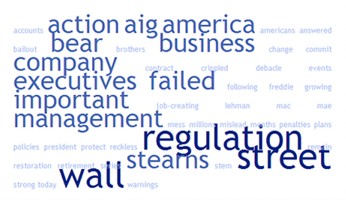
Just when you thought that Wordle was the be-all-and-end-all of the word tag cloud, along comes TagCrowd.com The tag cloud above is generated using Senator John McCain’s statement regarding the continuing Wall Street saga and the US government’s $85 billion bailout of AIG. The result is a handy visualisation of the most frequently used words in the speech. These word visualisations were found on The Online NewsHour in a post entitled ‘McCain pushes regulation, Obama blames failed economic philosophy in AIG statements.’

Here is Barack Obama’s reaction in a word cloud:

How is Tagcrowd different from Wordle? Both applications require the user to enter text, url or file for cloud generation. But whereas with Wordle, fonts, layouts and colour schemes can be tweaked, TagCrowd has more options for greater manipulation. The user has control of things, such as setting a maximum number of words to show in the cloud, setting a minimum frequency (not showing infrequent words), showing frequencies or not (word count next to word), ignoring words from a stoplist (ie. customised list of words to be removed), grouping similar words (eg. learned, learns, learning), ignoring common English words (eg. and, of, me), and other options. TagCrowd also allows the user to print a full-screen version of the tag cloud.

TagCrowd is more specific about the possible uses of the tag cloud:
‘When we look at a text cloud, we see not only an informative, beautiful image that communicates much in a single glance, we see a whole new perspective on text.’

There are some good suggestions for TagCrowd’s applications: topic summaries for speeches and text; a blog tool or website analysis for search engine optimisation; visual analysis of survey data; help for writers and students in reflecting on their work; and others.

I put in my blog url, and the result seems to have captured the front page: