New start – second week at Melbourne High School

Photo courtesy of Jose Cuervo Elorza on Flickr

As far as new starts go, this one feels good. Not one to go with the flow of things usually, change for me is often like a dentist’s visit I want to avoid. I admit the first few days weighed a little heavily with new procedures, finding my way around, new names and the loss of friends and familiarity of my old school, but one day into the second week and I’m really enjoying the experience.

Today we had 2 interesting visits in the library. At lunchtime Adele Walsh, Program Coordinator for the Centre for Youth Literature, came to talk to our Reading Group about The Inkys’ shortlist. (Sorry, I have forgotten the name of the lovely person who accompanied Adele and also shared her experiences of the listed books). Some people talk about books in a way that makes you want to drop everything and read all of them simultaneously, and this was one of those times. When you can talk about books without sounding like an academic, and without relating plot or analysing characters (without mentioning teenage angst!!), then you have the students listening with interest.

After school my head of library had arranged for Simon Shaw from Apple to come and talk to teachers about iPads as tools for learning and teaching. I’ve been to sessions about iPads before, and Simon’s session was probably the best one I’ve been to. There was no hard sell, just a focus on how teachers could do what they already do only better on the iPad, and a range of impressive apps, plus a hands-on session using iMovie. It was good to see a decent turnout too.

Wednesday I will be running an after-school session on Google apps. I have a serious problem when faced with ‘presentations’ and hope to improve with more practice. The research and preparation I do is excessive. Basically, I find it difficult to select a realistic portion of what’s possible. I’m sure the ridiculous amount of research is a procrastination technique. Finally, yesterday, I decided on what I might talk about and what I would exclude. At the moment this is all sitting on a page in my wiki – and looks awful. When I have time I should put this into a slideshow. If you’re brave, here it is. It’s not exhaustive but I wanted to showcase a range of tools. It’s difficult to prepare things like this when you have no idea of what your audience knows or expects, but hey, whatever.

Tomorrow lunchtime I will be meeting with the group of boys I’ll be working with as part of the Creative Writing group. I have inherited this group from my predecessor, and I’ve heard people refer to this group as the Competition Writing group which is an obvious clue in terms of what they do. I had a quick chat to the school captain who is a leader of this group today – lovely boy. I assured him that I didn’t want to change anything they were already happy with, but what did he think about also creating a blog so they could have an audience for their writing. Happily, he thought this would be a good idea. I’m really looking forward to working with these boys; I’m sure there is much passion and talent amongst them. In terms of the blog, I thought it might also be a space for any of us to share anything and everything about writing. Just now I received a Facebook update from the Facebook group, ‘The Wheeler Centre for books, writing and ideas’. I want to include this in a post to encourage the boys to join the group, and to show them what Facebook can provide besides chat.

The Wheeler Centre Facebook group also put me onto Australian Poetry, a Wheeler Centre resident organisation which is celebrating National Poetry Week with a different theme every day this week. There really are so many wonderful programs happening locally, and it will good to share these.

Well, that’s it from me. Just checking in after week 1 in the new job. My blogging has been slow lately, and this has a lot to do with the unsettling leadup to leaving one school and venturing into another. At this point I feel that I will have the opportunity to get involved in some interesting projects, and look forward to telling you about it all.

Have good days!

Changing schools, staying connected

I’m in a surreal phase this week, my last week at the school where I’ve been almost 5 years. An unwelcome illness kept me from school for 2 whole weeks (can you believe?) and helped begin the distancing process. Now it’s just 5 more days, and I really do feel like I’m in a strange half-world (although I think the prolonged illness is probably to blame).

The last couple of months have been very strange indeed. Our overseas trip during the last week of term 2 and the 2 weeks of holidays was full on, then major jetlag, followed by extreme tiredness and then the couple of weeks of fever and general unwellness, interrupted the normal routine. Somehow I managed to miss one son’s 18th (hiding out in the bedroom but very aware of noise and hilarity) and make it to the other son’s 21st last Friday which was very enjoyable.

Back to school for one last week, and Book Week will ensure that this week will not be without dramas and hopefully good times.

 [slideshow id=2810246167519885476&w=426&h=320]

As I think forward to my new school, new library team, new students and staff, I’m grateful that some things will carry across without any fuss. I’m talking about my online resources – my blogs, wikis and Google Sites which can be adapted to resourcing the new school’s curriculum, and can also still be used by teachers and students at my old school. At this point I can justify my determination to keep resources in the cloud and not just within the walls of the intranet. This way everybody wins.

I’m also very pleased that I’m seeing the fruits of a student blogging initiative. The blog I started as a library blog, Fiction is like a box of chocolates, mainly to promote reading, started to expand in different directions. Firstly, I involved staff in reviews to show students that their teachers read and diversely, and secondly, I pulled students in to write reviews. I wanted students to take ownership of the blog, and so a small but dedicated and talented group began expanding reviews to include film and games. I encouraged them to find their own style, and I’m happy to say that this is what occurred. The blog has become a platform for students’ interests, opinions and writing. One of the students went out on a limb and wrote about something close to his heart, depression and people’s attitude to it (in this post). The blog stats attest to the readership these boys attract, and I’m very proud of them. The boys also have big plans to write a Science Fiction story collaboratively which will be published as a serial in the blog. I’m looking forward to seeing how this project develops, and I’m happy that I can leave knowing that that this group of boys have taken ownership of the blog, that they can work together to keep this project alive.

I leave my school knowing that I can keep in touch with friends and colleagues online, and that we can continue to share ideas and online resources. Although I’m moving on, I’m looking forward to bringing ideas and skills to my new school as well as continuing to share with my old school.  My zone of collaboration is expanding.

I’m a teacher librarian. Put up your hand if you know what that means.

Librarians Are Ready [slideshare id=8693280&w=477&h=510&sc=no]
I was reading Jennifer LaGarde’s excellent post and nodding. So much I agree with about the school’s perception of teacher librarians, and reasons why teachers aren’t leaping to collaborate with us. Jennifer summarises it like this –
  • Teacher Isolation:  As a classroom teacher, I was deeply entrenched in my own world.  I spent so much time worrying about what was happening inside my classroom, I sometimes forgot there was a world spinning outside of it.
  • Teacher Education #Fail:  If my own teacher education program emphasized instructional partnerships of any kind, I forgot to sign up for that class.  Collaborating with other professionals was not a skill that I was taught in teacher school.
  • Librarian #Fail: This message was not being sent by the school librarians I worked with.  Or if it was, not very effectively.
I was a also ‘classroom’ teacher long before I decided to mutate into a teacher librarian. Teacher librarians and librarians belonged in the library and looked after books. They weren’t intrinsic to my day to day functioning. Since that time, the role and skillset of TLs has exploded, but who knows that apart from TLs themselves? We sigh, we complain to each other, we throw our hands up into the air, but we’re wasting our time  if we’re not collaborating for active advocacy. This point was made very clear to me during my Master of Education (Teacher Librarianship) studies at Charles Sturt University. I soon realised that it is one of the most important things to keep foremost in your mind, otherwise you are spending many, many hours creating resources no teacher uses; your offers of collaboration and support fall on deaf ears.
Thanks,Jennifer, for creating this flyer. Maybe we should screen this daily and hope that it gets through subliminally. Frankly, I think that TLs will not be accepted inVictoria, Australia, unless the focus of education changes from the content-driven, mark-based VCE to a focus on teaching and learning skills which are badly needed and which would equip young people for work and life.  Don’t get me started.
Of course, ‘selling yourself’ must always be accompanied by a sincere and consistent effort at developing real relationships. Don’t be a door-to-door salesperson. That’s just horrible.

How much personal information do we give away every day?

                                                             Image: ‘Facebook Wants a New Face
Facebook Wants a New Face

A couple of days ago my son had an unsavoury phonecall in the middle of the night from someone who had taken the trouble to conceal his number and his real voice. The incident prompted a discussion about privacy, about Facebook and ‘Friends’ and led me to notice this video in a blog post within Judy O’Connell’s Scoop.it .

[vimeo 24164915 w=400 h=225]

Privacy International – Data Trail from This is Real Art on Vimeo.

I’m all for the positive connections for students (and anyone, really) on social networking sites but I suppose unless something goes wrong, we might be tempted to overlook the reality of things. I think, as much as I enjoy sharing things with ‘friends’ online, I should review what I’m sharing and who I’m sharing it with. As educators we should be addressing issues of privacy and the implications of our digital footprint, and the best way is to model it ourselves.

Ladies and gentlemen – Joyce Valenza!

                                                                          from Things to Think About

Some people have the gift of being able to energize a conference room full of people. Dr Joyce Valenza is one of these people and that’s precisely what she did at yesterday’s SLAV conference: Communicate, collaborate, create: and think critically!  Joyce is undoubtedly one of the most inspiring, creative, passionate and personable teacher librarians to exist. At the end of the day, instead of trudging home wearily after a full day conference, I wanted to start on ten projects simultaneously. And I wasn’t the only one.

Joyce compares the library to a kitchen with the librarian as Masterchef. The kitchen is the hub of the house, the place where people gather to create, to share discussions and enjoy each other’s company. I like this image of the library as a dynamic place for people. Yes, libraries house books but the books are also created by people.

Joyce also adds the analogy of the librarian as a curator. At a critical time when lack of understanding of the times in which we live and the teacher librarians’ role in curating the information deluge threatens the role of teacher librarians and sees them being replaced by non teaching staff precisely when more human intervention is needed,  Seth Godin’s words ring true – “We need librarians  more than we ever did. What we don’t need are mere clerks who guard dead paper.”

So how do we go about re-educating principals, teachers and everyone else about the crucial role of teacher librarians in education? Joyce talks about the need for parking stations for our lessons and resources. Record, document and share everything you do. Park your stuff in slideshows, wikis, blogs, wherever people can see it. Share everything with everyone and you have provided yourself and other teacher librarians with evidence of what you do and why it is crucial for teaching and learning. This is how we lead, and we don’t need to be in obvious leadership roles. But we don’t hide behind the circulation desk. We go out of the library and we bring the school into our library. We show people how diverse our role is, what connections we have across the school, what skills we bring and what skill sets we teach students and teachers.

Everything you need is housed in this wiki Joyce put together for her downunder visit. That will keep you very busy. The backchannels were busy too so you can find a summary of ideas and resources through the Twitter hashtag #slavconf (click here) and also on Todaysmeet/melbourne. I didn’t take notes; there was no need. I just watched Joyce deliver not just a presentation but her testament to a lifetime as a passionate teacher librarian who is also a change agent. She demonstated our role as something vital to schools, something fun and rewarding. She encouraged us to be fierce (and Joyce, I never did wear any of those holiday sweaters you mention), she passed on to us the confidence and courage to take our rightful position at the centre of learning and teaching.

Thankyou, Joyce, for sharing your wonderful resources – amongst these, your TL Guides, your research tools, your 21st century tools. I was fortunate to be present at last year’s conference too, and I hope we will be able to see you again soon. Thankyou to SLAV for organising this very successful conference.

I go away for 3 weeks and what happens… Still, I’m nonplussed ;)

A little over a week ago, my family and I (husband and two sons) travelled overseas for a very full 3 weeks. My husband and I haven’t been overseas since the early 1980s and neither of my sons have been out of Australia at all. We were probably a little too ambitious to cover so much ground in such a short time, but it’s difficult to decide between staying longer in places and getting to see more. The itinerary included Berlin, Prague, Padova, Verona, Milan, Moscow and Singapore, and when you consider how much of the 3 weeks is taken up travelling, it’s really only a couple of days in each city. If I did it again, I’d definitely go in milder weather – the heat and humidity was taxing – but with a son in Year 11, we didn’t really have any choice. And at the end of the day, we were very lucky that everything went smoothly, and now we have the memories and photos to savour.

[googleapps domain=”docs” dir=”present/embed” query=”id=dcb397dn_179d7ss6mfr&autoStart=true&loop=true&size=m” width=”555″ height=”451″ /]

So, I go away for 3 weeks and suddenly everyone has jumped onto a new social networking planet – Google+. Once I’m back, I have every intention of catching up but the effects of jetlag prevent me from comprehending anything. So, after a week of mental obscurity, I finally accept an invitation and go in to have a look around.

Did I expect to forgo the linguistic oddities in this new social network? No. So I come in, and people are huddling, creating circles, doing ‘hangouts’, sparking conversations. It all sounds very social and I’m interested in having a play so I can compare it to what happens on Twitter and Facebook. I’m not sure that Google+ works as a name, what with the ‘+’ symbol at the end which renders any punctuation after that ridiculous. Of course, I’m aware that Google+ is not a new, isolated product, but an extension of Google itself, a social extension so the name does make sense from that perspective.

I like the idea that Google is trying to create a one-stop shop for people already using Google, and the extensions make sense for people like me who already use gmail, Google docs, Google presentations, Google calendar, etc. And I’ve read that Google is trying to make our online connections more like real life.

Creating Circles of people in your life is the first step. I agree with Google that having different circles for friends and colleagues is a plus. Currently on Facebook I’m cutting back on the professional sharing because I’m aware that my non-teaching friends will find my posts annoying if they’re on Facebook to share photos and everyday things. So Circles makes a lot of sense. Also the idea of selective sharing sounds good; I’m not sure how to do that on Facebook except through messages and that doesn’t include the sharing of photos, does it?

 Circles makes it easy to put your friends from Saturday night in one circle, your parents in another, and your boss in a circle by himself, just like real life.

I like the fact you can drag and drop people into circles but I’m already suspecting that I may have created too many categories and will confuse myself. In terms of how many people you have in your circles, the recommendation is to have heaps for breadth, and I do that already with Twitter, so I’m okay with doing the same here. Although I’m not sure whether I’ll end up keeping up Google+ and Twitter AND Facebook – too many networks. I think many people feel the same, and I’ll be giving Google+ a longer trial period before I decide to delete any previous networks.

Sparks is also an interesting concept.

Remember when your Grandpa used to cut articles out of the paper and send them to you? That was nice. That’s kind of what Sparks does: looks for videos and articles it thinks you’ll like, so when you’re free, there’s always something to watch, read, and share. Grandpa would approve.

In fact, my mother still cuts things out of the newspaper for me and my sons, and I don’t have the heart to tell her we can read everything online. Still, the idea of sharing interesting information is a good one. I’ve organised my Facebook groups in a similar way so that organisations I’m interested in send me updates of interest, saving me the trouble of going out and looking for them.

I’ve yet to be involved in a hangout but I imagine if I enjoy webinars I might enjoy the opportunity to come together for an informal chat with friends. Let me know if you’re organising one of those.

Bumping into friends while you’re out and about is one of the best parts of going out and about. With Hangouts, the unplanned meet-up comes to the web for the first time. Let buddies know you’re hanging out and see who drops by for a face-to-face-to-face chat. Until we perfect teleportation, it’s the next best thing.

And the group chat sounds like a fantastic idea so I can’t wait to try out huddle.

Texting is great, but not when you’re trying to get six different people to decide on a movie. Huddle takes care of it by turning all those different conversations into one simple group chat, so everyone gets on the same page long before thumbs get sore.

Instant photo upload I don’t get at all yet. Photos uploading themselves makes me nervous – what does that exactly mean? And the video doesn’t make it any clearer so I’ll have to do a bit of research there.

[youtube=http://www.youtube.com/watch?v=6y_xKVSRAy8&feature=player_embedded]

This post is already too long so I won’t elaborate any longer. If Google+ is a way to manage online your real life and real life friends, then I’d better go back to real life. Bye.

Apps enhance storytelling with animation and interactivity – Morris Lessmore

Creating pictures in your head from text in a book is one way of reading. I’m finding more examples of online reading experiences which combine animation and interactivity and transform the reading experience. Whether you lean towards lamenting the loss of private headspace or not, you must admit that some of the story apps are beautifully crafted, and even you might not be able to keep your hands off them once your start reading.

One such iPad app is the Morris Lessmore story –

Put yourself in Morris’ shoes as you dive into the story of Mr. Lessmore and his flying friends through Moonbot Studios’ first Interactive Storybook. In this reinvention of digital storytelling you can repair books, tumble through a storm, learn the piano and even get “lost in a book,” flying through a magical world of words, giving you a dynamic journey through the story. This iPad App has been touted by Apple as one of the “Top New Apps for the iPad,” and will surely be enjoyed by children and adults alike. Using rich CG animation, innovative interactivity, original composed music, and unique games sprinkled throughout the book, this App will revive a love of story in all.

I’ve included 3 short videos about the making of Morris –

[vimeo http://www.vimeo.com/21823500 w=400&h=225]

The Making Of Morris: Part 1 (The Power of Story) from Moonbot Studios on Vimeo.

[vimeo http://www.vimeo.com/23216951 w=400&h=225]

The Making Of Morris: Part 2 (Animation We Cherish) from Moonbot Studios on Vimeo.

[vimeo http://www.vimeo.com/24570687 w=400&h=225]

The Making Of Morris: Part 3 (Thousands Of Books) from Moonbot Studios on Vimeo.

Although the story is obviously suitable for younger students, I think that there is also so much a middle school teacher could do with it, from the perspective of storytelling, illustration and animation. It could be used as a writing prompt or studied for film technique. Students might create their own illustrated story or animation. I love the marriage of art and story! I remember how upset I was when, as a young child, I moved from picture books to pictureless books. Now with graphic novels, animations for all ages and increasing interactive and animated book apps, I’m happy again!

Hello, anybody out there? Writing for someone

Somehow I managed to create a visual presentation in the period before coming into a Year 9 English class to talk to the boys about blogging. My focus was on the motivation for writing and the reason why you would want to write a blog. I wanted the students to think about people writing from earliest times, what motivated people to write so that others would read. Whether it’s the love message scratched onto a tree or the messages on the back of a toilet door – or on Facebook – people seem to want others to read what they have to say. I told the boys that when I was their age, in order to have your writing in print, you had to either be super talented or important, or perhaps succeed in having your letter to the editor make the local paper. Not so anymore – we can all be published online and enjoy the satisfaction of audience participation through comments.

I’m sharing the visual part of this lesson in case anyone else finds it useful.

[googleapps domain=”docs” dir=”present/embed” query=”id=dcb397dn_157f26fq4dh” width=”410″ height=”342″ /]

Google Image Search revealed (and a dilemma)

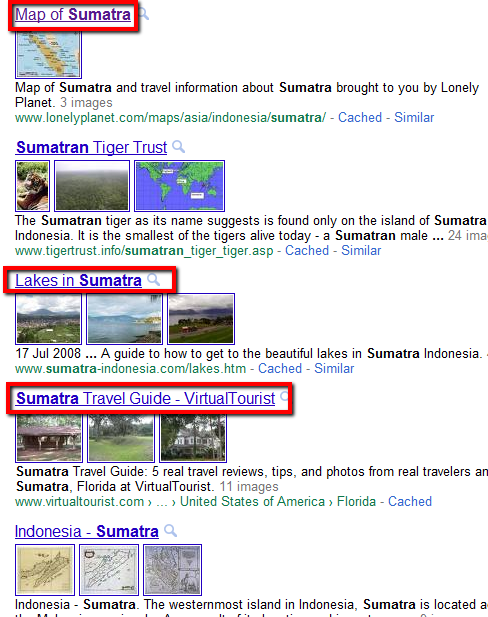
This week I created a presentation for Yr 8 Indonesian students who were in the process of researching and collecting images for their Indonesian Island project. Most of them were creating a Photostory or similar in Video Studio, and this was a good opportunity for a Google Search show and tell. Although googling is something students do naturally and frequently, experience tells me that most wouldn’t have lingered on the search page long enough to check out the options in the left hand navigation.

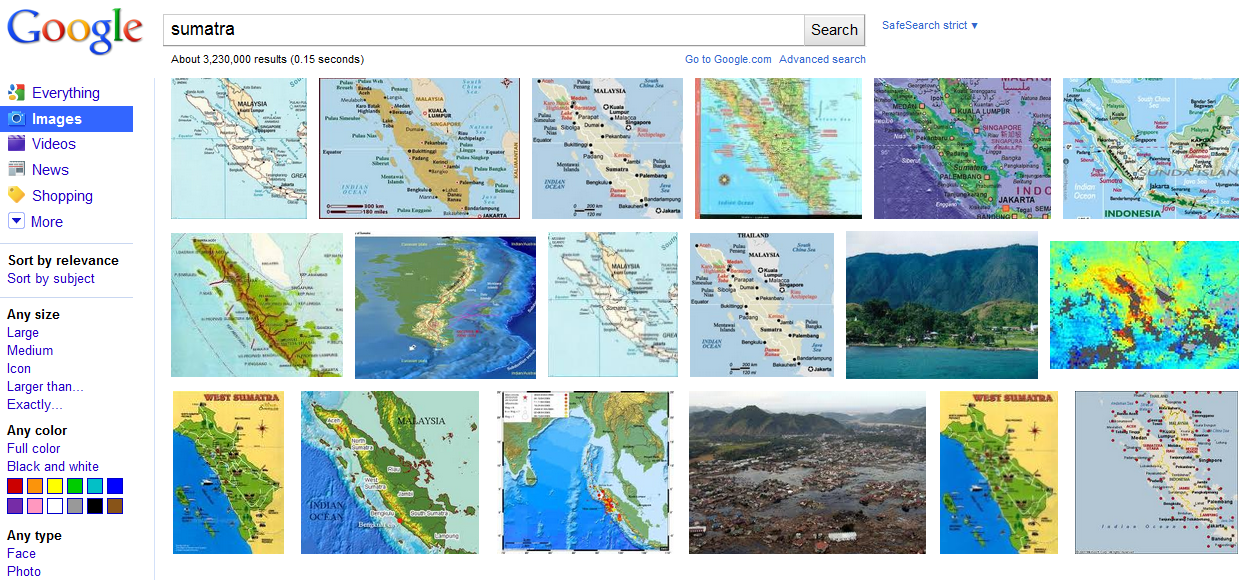
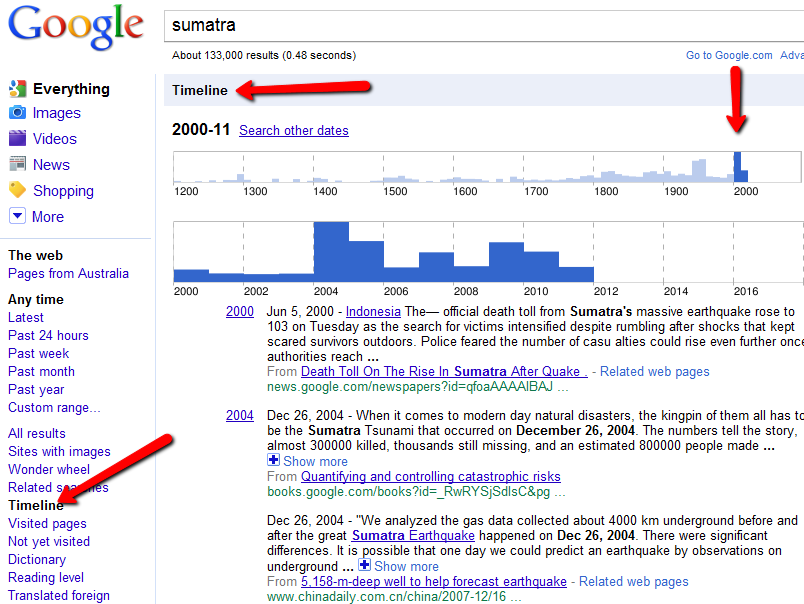
I put this presentation together very quickly and used ‘Sumatra’ as the keyword demonstrating the different possibilities for website and image search. Here is the link.

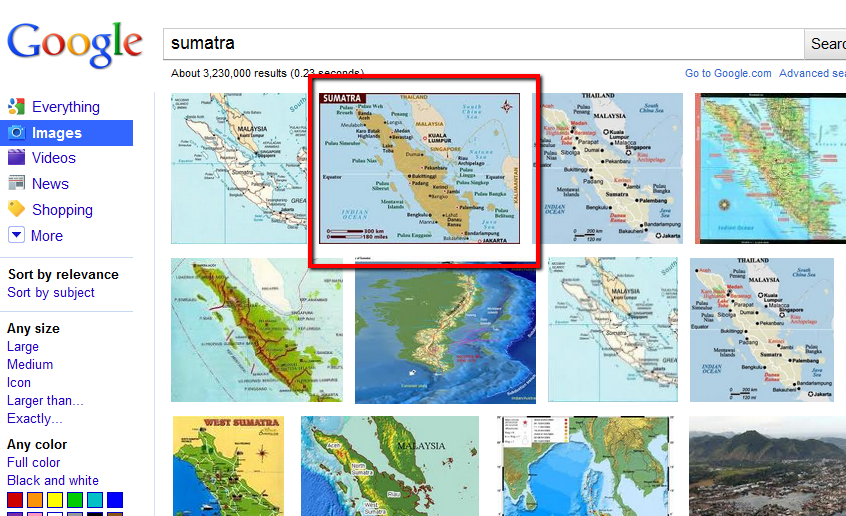
The screenshots I included as examples of different searches made it clear that Google offers much more than the basic search. Compare what you would see if you did a basic Google image search (shown below)

I do feel somewhat torn between getting excited about undiscovered aspects of Google Image Search and the fact that the images are not searchable by Creative Commons licence. I wonder if Google would surrender to pressure and provide free-to-use images along with their search options. Judy O’Connell has written about this issue in her excellent post, Stop turning a blind eye! Media literacy in action.

So, although I still showed students the wonders of Google searching, I did introduce the issue of Copyright and ethical use of others’ information and images to the boys, and showed them Google’s Advanced Search using the ‘labeled for reuse’ option.


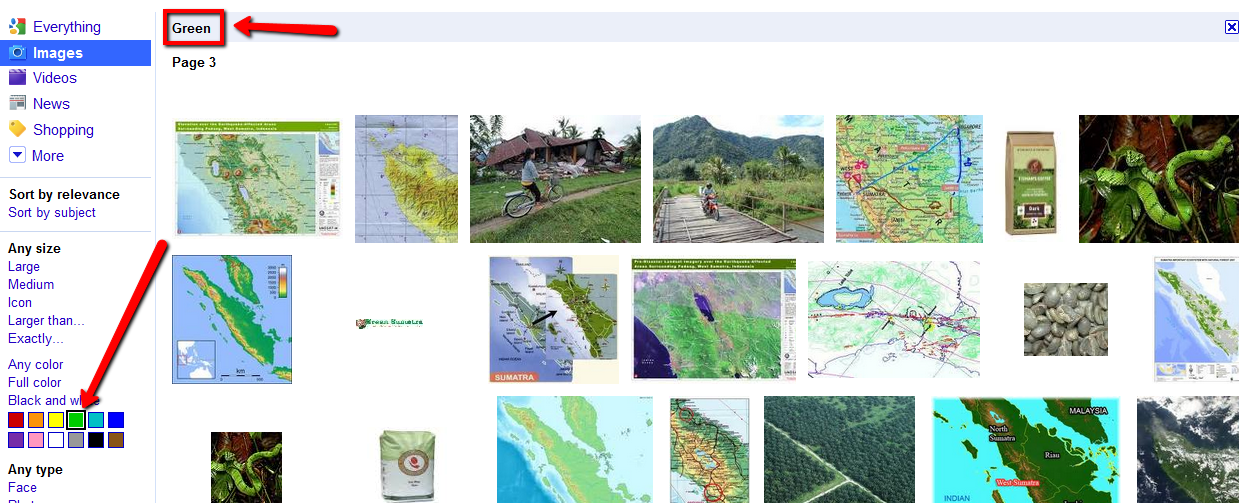
Although my conscience was barely appeased, I continued with the presentation, starting with the colour options. Green, for example, for ‘Sumatra’ –

Orange…

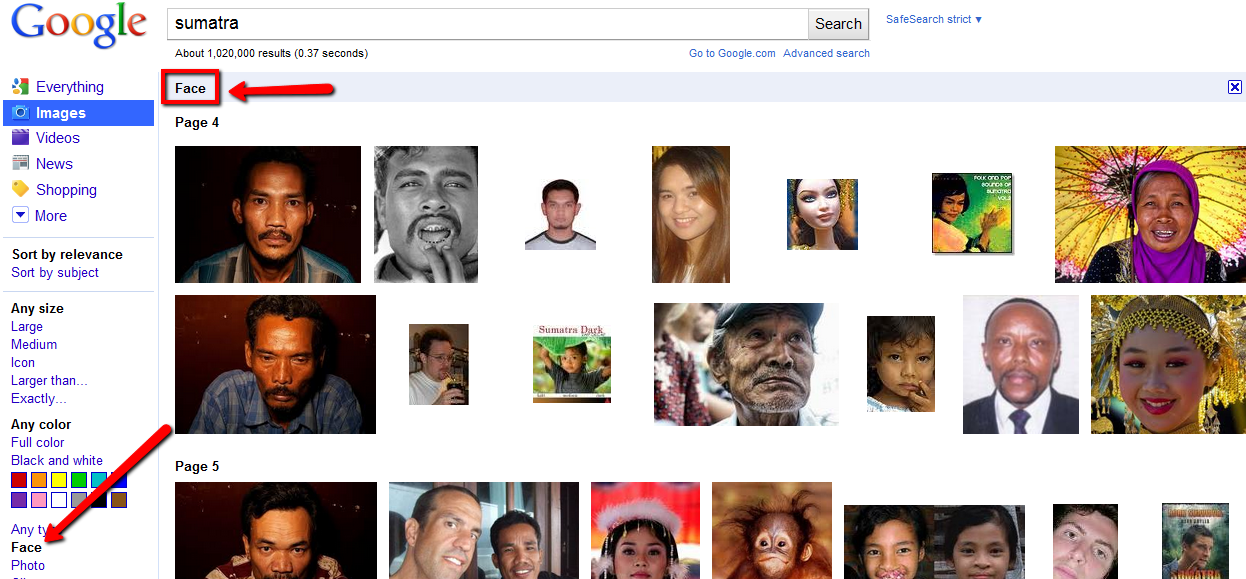
Here’s an opportunity to engage students in a discussion about why a certain search option would be helpful. Why would we want to use a ‘face’ search? Perhaps if we searched for a person whose name retrieved irrelevant results, then ‘face’ would push photos of people to the top. The ‘orange’ search pushed a whole new range of results which you might not have seen otherwise. In terms of colour design, this option is brilliant too. The black-and-white and photo options often retrieve older photos, so again, the results are different, possibly useful for a historical perspective. The line drawing option looks good for primary level.

One of the best image search options, in my opinion, is Google’s Sites with Images search. I’m sure students overlook this one, and it makes such a difference to the way you can use results. You have a clear window into which websites these images are coming from so you can evaluate the website before you click on the images. This is another important aspect of search which is worth teaching because it involves the thinking and evaluation process.

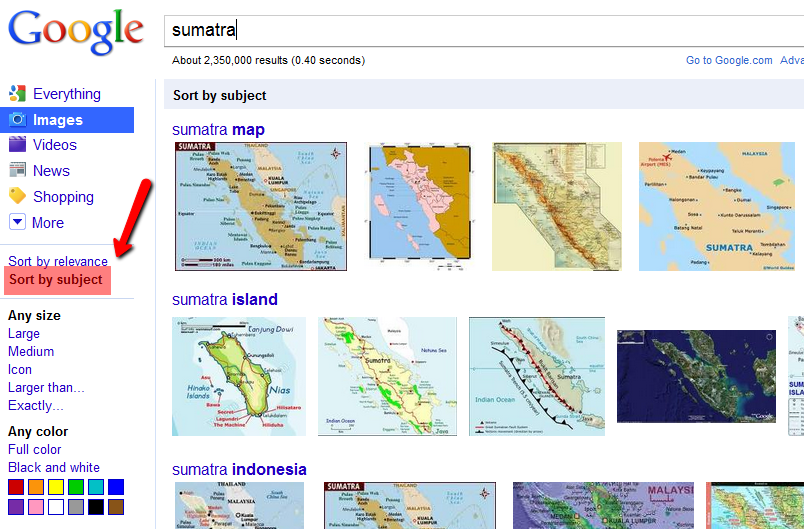
How much easier is it to sort through image results when they are categorised for you! Searching by subject is just as good –

And finding similar images couldn’t be easier – just hover over an image to find similar images or more sizes.

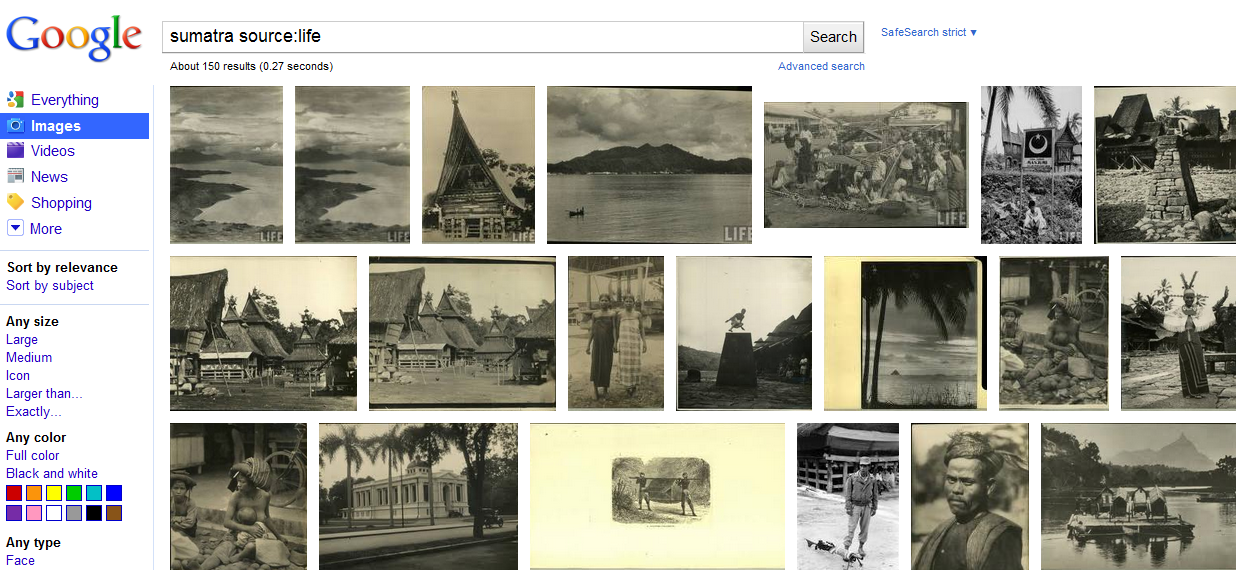
The LIFE photo archive hosted by Google  is a wonderful collection of “newly-digitized images which includes photos and etchings produced and owned by LIFE dating all the way back to the 1750s. Only a very small percentage of these images have ever been published. The rest have been sitting in dusty archives in the form of negatives, slides, glass plates, etchings, and prints.” A fantastic opportunity to find images you wouldn’t normally see, and excellent for history.

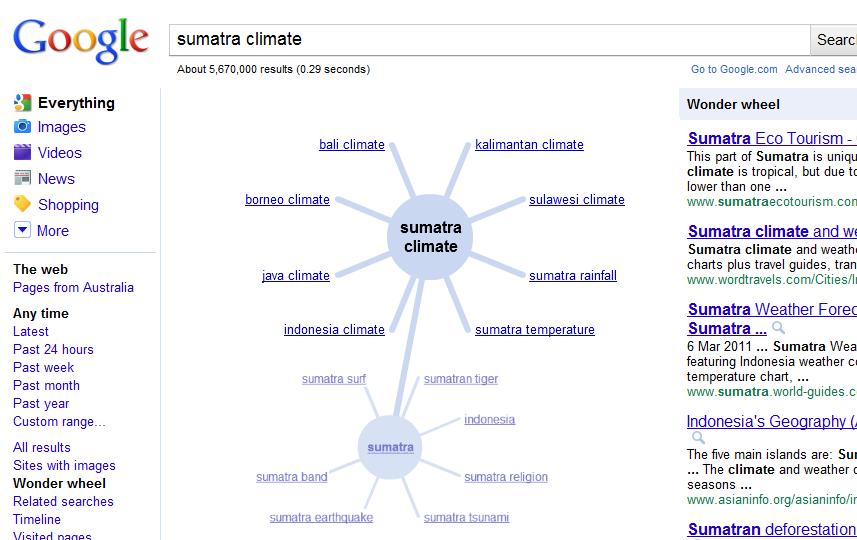
At this point I left the Google Image Search and featured a few of my favourite Google search options, starting with Wonderwheel. For students who interpret results better when presented in a visual way (that includes me), Wonderwheel is the way to go. It’s the brainstorming search option, providing you with different aspects of the original keyword. You simply click through all the suggested keywords to get to the precise one you need.


Wonderwheel even reminds you of aspects you may have overlooked.

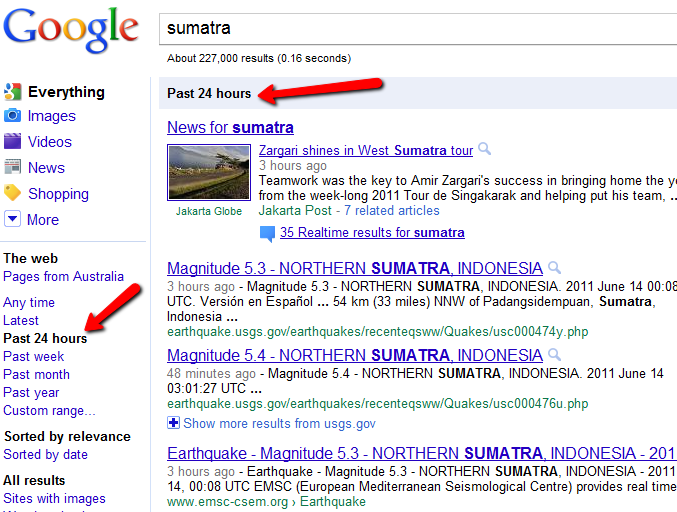
For latest news and current results Past 24 hours search is brilliant –

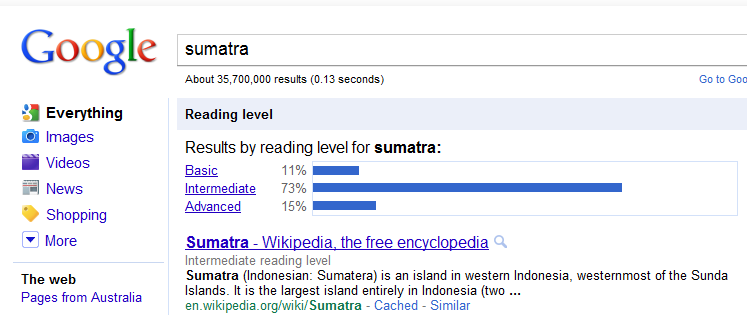
I also pointed out to students the Reading Level search option which divided results into Basic, Intermediate and Advanced. The basic search results shouldn’t be overlooked by secondary students. I explained to the class that if they wanted a quick overview of their topic, the basic search result was very useful.

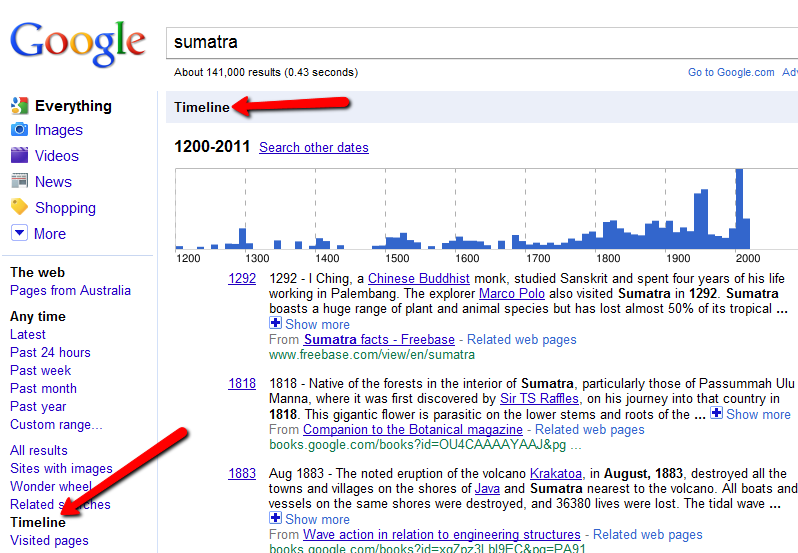
One of the most impressive of the searches is Google Timeline Search. Here you get a graphic representation of results for your keyword over time. If you see a peaking of results in a particular year, your curiosity will have you clicking and drilling down until you have zoomed into the results for that period of time. So much fun.

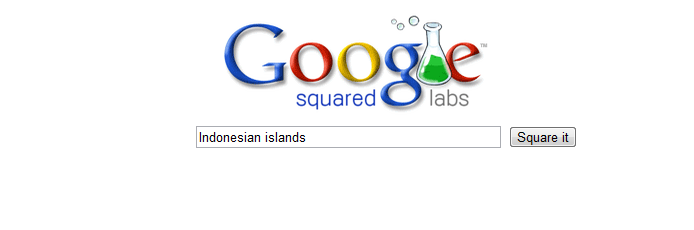
Finally I took the students into the Google Labs where creative play turns to new and exciting options, and showed them Google Squared Labs.

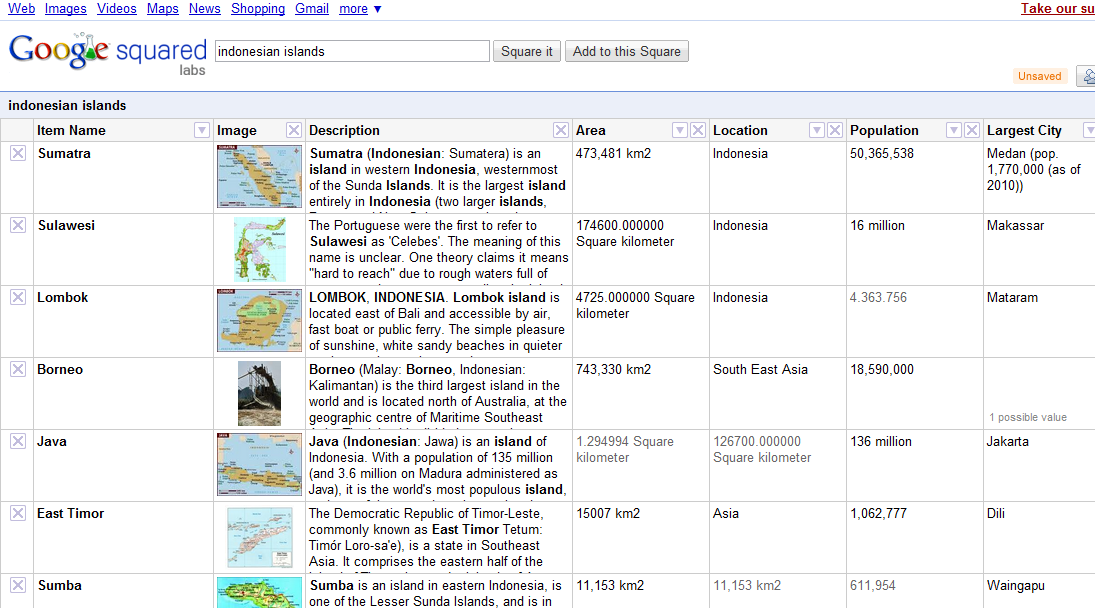
For easy reading and overview of facts and figures, Google Squared Labs does a great job of presenting the information in spreadsheet style. Although I haven’t had success with all my searches, it’s definitely worth trying for factual results.

Finally, I showed the students a few of my favourite visual search options, including Tag Galaxy (which never fails to impress),  Behold which finds free-to-use images, and Spell with Flickr for headings. Of course, there are so many more options for image search, even for Creative Commons images, and some of them are here.

Twitter conversion

“Watching from the outside, Twitter is like the dumbest thing you’ve heard of: “Why would anyone want to tell others what they are doing in 140 characters?”

And yet to dismiss Twitter is a mistake because it’s an incredibly powerful tool for your personal learning and connecting with others.”

(Sue Waters, http://suewaters.wikispaces.com/twitter, @suewaters)

Since I have a Twitter presentation to staff coming up, I thought I’d collect my thoughts about Twitter in a blog post. I’m not aiming to write a comprehensive guide to Twitter, just in case you’re wondering. Other people have done that.

Twitter is a community you build like any other community. You can’t tweet into a vacuous space and expect a response. Twitter is a conversation, a sharing of ideas, information and resources, which can only happen if you develop relationships with other people on Twitter. Follow people you know on Twitter, people who share your professional interests if you’re on Twitter for that reason. Then have a look at who they’re following; follow some of those people, and start joining in the conversation, sharing what you think/write/know/want to know. You will come across other people in these conversations, and you will want to follow them too. Before you know it, you will have a sizeable Twitter community.

When you start – prepare to feel confused, invisible and frustrated. Until you build your network – and that takes time – you will feel that Twitter is a waste of time. You will say to yourself, I tried, nobody answered, I don’t have the time to spend following people, commenting and retweeting. This is very much part of the initial process, unfortunately. But hang in there and all will be revealed! It’s very much worth it, Twitter is a lifeline to many people. I don’t know what I would do without Twitter.

How many people should you follow? there are no hard and fast rules here, it’s really about personal preference. Some people say they prefer to limit the number to keep it manageable. True, but with lists you can easily control a large network. I like to remain broad, and every day I find people I can’t resist following. As soon as I follow them, I add them to a list so that their tweets don’t drown in the gush of tweets in the general column. As teacher librarian, I resource the curriculum, and so my scope is broad. I have lists for most areas of the curriculum. Tweetdeck is good for displaying these lists in columns. You can also follow a particular person and their Twitter conversations if you like.

Even the lists can get out of  hand. Currently I’m having a serious talk with myself about getting my act together and weeding out all my Tweetdeck columns. I’m very greedy, but this kind of greed comes back to bite you. You have to let go. You can’t keep up with all the conversations, no you cannot.

Of course, don’t focus on getting followers just for the sake of it. Your network has to be real, and the connections you make have to be real. Even in 160 characters people can tell if you are genuine or not. How you develop your relationships is vital to the quality of networking you will have.

It’s good to expand your twitter network to include people outside your workplace, your city and even country, to have the advantage of an international breadth, but it’s also important to maintain connections with people closer to home, and to have face to face contact with these people whenever possible. Just when you think you are happy with an exclusively online community, a face-to-face meetup will remind you that you still need to see somebody’s face. In  the flesh.

Like any society, Twitter has developed its own set of rules and etiquette. This has evolved naturally as these things do in any society. There is good behaviour and there is annoying behaviour, and although we’ve all been there with initial overtweeting on days when we’re passionate about something every 2 minutes and just have to share it, we should probably reign ourselves in to stop losing followers.

What you can and should do: share finds/posts/questions; retweet the good stuff; retweet to support your friends; encourage and thank; respond to requests for help and support.

What you should avoid doing: just retweeting without sharing anything that you’ve found, riding on the backs of people; tweeting every 2 minutes unless you’re tweeting at a conference; and here’s a good one –

Avoid Banal Food Updates
Unless you narrowly avoided death by eating a puffer fish, nobody really wants to know about what you
are eating today. If you ate at a cool restaurant and want to recommend it, that is fine. Dissecting what
you had for lunch if you just went to McDonalds is not. Just ask yourself if this is interesting to your
followers – if the answer is “yes”, then it’s OK to tweet.

(http://www.webdesignerdepot.com/2009/03/the-ultimate-guide-for-everything-twitter/)

Don’t underestimate the bio:

There’s a lot you can learn about a person from their bio (160characters) and link (to blog or whatever), and by looking at the top 6 or so tweets in their profile.

The bio challenges you to compose something short, sharp and very you. I’ve changed my bio a couple of times – every time I read it and feel embarrassed, or if I discover something more vital to include. I think there’s a skill to writing the perfect bio but I haven’t discovered it yet.

It’s a good idea to have an online presence, eg a blog or wiki, Flickr profile, for people who want to check you out. Your blog displays your interests, areas of expertise, your personality, your work. If you’re on Twitter with no link to anything else about you online, you’re really not giving people much of an insight into who you are. If you don’t have a blog, try a wiki, Flickr, Linkedin, or something like that.

One of the great things about Twitter is using hashtags during a conference. I concentrate better on a keynote when tweeting this way. People appreciate it, and it’s a great way to discover who is present at the conference, and have a quick hello chat. Even if you’re not able to attend, you can participate and have a window into the conference by following people’s tweets with the conference hashtag. I feel less envious of people at international conferences when I take part online.

Hashtags are great when you follow what people are saying during extraordinary events, eg floods/fires/hurricanes; elections; royal weddings; Eurovision, etc. Just be careful – although people will sometimes get information and photos out before official news (because they happen to be on site), it’s unconfirmed information, and people will retweet unconfirmed tweets, suddenly that tweet has been retweeted hundreds of times which makes it look convincing when it may not be true.

Okay, so I haven’t covered everything – I could talk about #followfriday, about the convenience of mobile Twitter, but then the post would be ridiculously long. Take a look at Sue Waters’ comprehensive guide (@suewaters). Have a go, take the time to make it meaningful, then come back and tell me what you think.

[scribd id=14062777 key=key-2kpjs1tj6u62oatw6q5z mode=list]

Button up, we’re out in the open

css.php