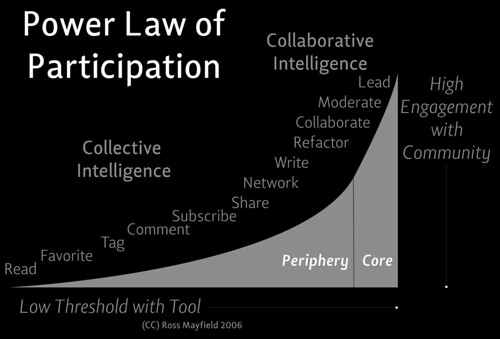
Tag Archives: Web 2.0

Teacher’s guide to Twitter

Still in Twitter mode, I’d like to share the teacher’s guide to Twitter by Kate Klingensmith on her blog Once a teacher.

Kate’s post answers those who question whether Twitter is worth the effort – and perhaps all of us have been there. I was certainly there not long ago, and am still expanding my Twitterverse.

Most people start off in a rocky relationship with Twitter.  It doesn’t seem to be as easy or as useful as everyone has said, it takes awhile before you find your niche, and there is an overwhelming amount of information to deal with.  But, just hang on – it’ll be worth it!!! 

Kate links to Mark Marshall’s post ‘Twitter: what is it , and why would I use it?’  Mark explores how to get started, why you would want to share stuff with strangers, and how to get followers in order to make  Twitter a meaningful experience. After all, there’s nothing sadder than a Twitter account with only a handful of followers.

Kate also posts useful information, such as how to manage your life on Twitter, how to control all that information, and favourite Twitter-related tools, and Twitter links.

Finding people to follow is initially problematic. Kate helps out by sharing directories of educators and professionals on Twitter, or suggesting that people use the Twitter Grader keyboard search, or Twitterholic.

I found Kate’s advice about keeping up with the everflowing or even overflowing Twitterstream very helpful (since at times it’s like trying to keep up with the treadmill without falling over

You’re standing on the bank, enjoying the stream as it passes, but you can’t worry about enjoyoing every drop of water that’s there.  Don’t worry about the tweets you missed – I promise that there are always, currently, very interesting things to read.  But – it is nice to catch up sometimes by browsing old tweets on peoples’ profile pages.

Also useful are the links to shorten urls, such as tinyurl  and fun symbols you can use in your tweets. It’s all part of the Twitter grammar and vocabulary.

My favourite section of Kate’s post, however, is the one that links to her favourite Twitter-related tools. Tweetdeck is a more attractive and organised way of receiving tweets; Retweetlist tells you who’s hot on Twitter; and my favourite for today – Twistori, where you can search tweets that start with ‘I love; hate; think; believe; feel; wish.

I wish that I could twitter about something other than food today, but I’m so hungry now;

I love the way the brain cell finally gets up when the body has already begun the day

I hate chasing the clock

Okay, that’s enough reblogging. Here’s where I discovered this fantastic post – on Top 100 Edu Tweeters, which has been revised recently, I’m sure.

Thanks to @Elizabeth Koh for the Top 100 link.
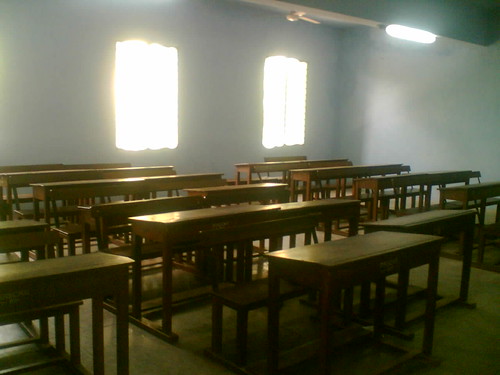
Networking is working for some in the classroom

Photo by Thiyaga on Flickr

In his post The added value of networking, Will Richardson quotes Greenhow in a Harvard Graduate School of Education magazine editorial entitled “Thanks for the Add. Now Help Me with my Homework.” , who says that the kind of skills students are developing on social networking sites are the very same 21st century skills that educators have identified as important for the next generation of knowledge  —  empathy, appreciation for diversity of viewpoints, and an ability to multitask and collaborate with peers on complex projects’.

And yet skills are not the kind of thing that most people would expect to associate with Facebook or MySpace. Online socialising, maybe, wasting time, perhaps, collection of  too many ‘friends’ who couldn’t possibly be real friends, definitely, and what about inappropriate language and photos?  Isn’t this how most responsible people view social networking?

Surprisingly for many, and difficult to believe for most, is the fact that social networking has opened up a range of much more interesting possibilities for young people. Will quotes Greenhow saying that

most students use the medium to reach out to their peers for emotional support and as a way to develop self-esteem. One student created a video of his intramural soccer team to entice his friends to come to his games. Another created an online radio show to express his opinions, then used Facebook to promote a URL where friends could stream it live, and then used one of Facebook’s add-in applications to create a fan site for the show.

Recently our Head of English has decided to use Facebook to engage our year 12 boys in a discussion of their texts, as well as provide a platform for general questions about English skills. I’ve mentioned this in a previous post. What a brilliant idea! The boys are already on Facebook in their free time, so why not use the groups application in Facebook? What has ensued is an intelligent and stimulating collaborative discussion, in which the teacher comes in to stimulate discussion and answer questions only inasmuch as all this hasn’t been taken care of by the boys. There’s something to be said for this kind of discussion where everyone can comment, taking their time to think, not being interrupted or intimidated by others, or being able to re-read comments for clarification and review.

The Facebook project obviously had to go through the correct procedures before starting, eg. parent approval, and presentation and justification to the principal. This process is a good way to inform the school community, as well as clarify the teacher’s own reasons to support teaching and learning.

The relationship between the teacher and the boys would be strengthened, I imagine, following the Facebook group project. A teacher coming across to the students’ preferred way of communicating could only be seen as positive. The tone of the conversation is friendly, open, encouraging and often spiced with humour. The divide between teacher and student is diminished, as the teacher becomes more approachable. I think students would also appreciate the fact that the teacher is taking the time to interact with them after hours.

I only wish that somehow parents could see the valuable conversation that is taking place, so that they would understand the value of such a project, but I doubt that these students would enjoy their parents having access to their Facebook accounts!

What were those networking skills again? Empathy, appreciation for diversity of viewpoints, and an ability to multitask and collaborate with peers on complex projects. Students supporting and encouraging each other; learning to respect others’ viewpoints, working together to explore ideas and understandings. Not bad skills for life…

Earthquake in Melbourne: Twitter beats breaking news

Sitting on the couch earlier this evening, I felt a strange sensation of moving with the couch, as the bookshelf behind me creaked. Melbourne had experienced a light earthquake. Did it happen or did I imagine it? After a while I tweeted it in the form of a question, hoping to ascertain whether it really happened or not. Sure enough, Twitter exploded with tweets registering similar experiences.

Meanwhile, the TV was on, but no news about an earthquake. Look at ABC news online – nothing. Channel 7 Breaking News remained unbroken – just a repeat of the stories that had been broadcast several times already this evening.

Gradually, traditional news providers came on board. Channel 7 finally acknowledged the quake at 10.27 pm. Very slow, considering John Connell had already completed a post about the Melbourne quake from Scotland.

Here it is, and he has an image of the first 18 twitterers – I’m there on the right. I would have been quicker but my laptop was doing its usual slow-loading.


As Craig has pointed out in a comment below, Breaking Tweets (World News Twitter style)  reported 800 tweets before media jumped in.

Siftables – the toy blocks that think

[youtube=http://www.youtube.com/watch?v=JP0w9lZoLwU]

David Merrill is the creative inventor of Siftables, small computer blocks that interact with each other, offering a myriad of learning possibilities using physical manipulation and play.

I’m so inspired by people like David, and by the way he talks just as much as what he does. His passionate explanation of his new discovery reveals  creative and innovative thinking. He says “I started to wonder… what if…?” And that’s the point where you  know something great is going to happen. ‘What if…?’ is something I think we should do more often.

So he thinks ‘What if, when we use computers, instead of having a single mouse cursor, we could reach with both hands and grasp information physically, arranging it the way we wanted it?’

David’s idea came from watching kids play with blocks, and understanding that through this physical play they were learning how to think and solve problems by understanding and manipulating spatial relationships.  He argues that spatial reasoning is deeply linked with how we understand the world around us.

From this idea, David, the computer scientist, came up with a concept and developed a new tool – Siftables; you could grab information physically and arrange it the way you wanted to. Siftables, according to David, are an example of a new ecosystem of tools for manipulating information, for exploring new and fun interaction styles. The blocks are somehow aware of each other, aware of the nuances of how we move them, and respond accordingly. The examples he showed were language and maths games, as well as musical composition, but he hinted that there were many more applications.

The game aspect is appealing. As David says, you don’t have to give kids many instructions – they work it out for themselves by playing around with the blocks. Discovery.

The music was my favourite example, and I immediately wanted to have a go.  The Siftables enabled you to inject sounds into a sequence that you could assemble into the pattern you wanted.

David says, ‘My passion is to make new human computer interfaces that are a better match to ways our brains and bodies work… we are on the cusp of a new generation of tools for interacting with digital media that is going to bring information into our world on our terms.’

A powerful statement.

I like the way he’s thinking about matching digital tools with our brains AND bodies. I often think about how traditional education, with its expectation that students sit still and listen for prolonged periods of time, or work on teacher-prescribed work which focuses on text, doesn’t match the way adolescents function, and definitely doesn’t take into account their need for physical activity.

Siftables may have been created for young children but I think there is much potential for adolescents too. This is an excellent example to underline something I’ve been saying for a while: technology is not an end in itself. Technological tools are just tools, but they can enhance learning, and with the learner in mind, and particularly with the learning aims in mind, they can enable creative and innovative activity.

 Thanks to @marciamarcia for this link.

Shakespeare on Facebook

[scribd id=4907297 key=key-10nxnctst7rgc6yw9e62]

This made me laugh. Some of my favourite Hamlet statuses:

Hamlet wonders if he should continue to exist. Or not.
Hamlet added England to the Places I’ve been application.
Ophelia loves flowers. Flowers, flowers, flowers. Oh look, a river.

I wonder if other versions exist. This could be a creative writing idea. You actually do need to know about the play to be able to write the statuses.

Photo courtesy of Sakypaky on Flickr


Our Head English teacher is using Facebook in the hope that it will allow boys who don’t usually contribute in class to have a voice in front of their peers. How do you explain to cynics your choice of Facebook as a platform for learning?

Adolescents have moved to Facebook for networking and communication. I’ve become a Facebook addict myself. One of its offerings is a non-threatening form of communication with a potentially large group. Another is the satisfaction of belonging to a group. It’s more accepting and democratic than face-to-face interaction – it doesn’t judge you by your appearance, age or abilities. You can choose your own hours. You can stand back and observe, or you can jump in and lend your voice.

Transfer all this to a learning environment, and you have a potentially brilliant scenario. Those who are slower to respond to discussion will not be pushed out. There’s time to think, respond, edit. The teacher can set the stage and then creep back to give control to the students. Hopefully, students will feel more comfortable to ask questions, give suggestions.

Those of you who’ve been reading my blog will know that I believe we should use technology and social media in creative ways to facilitate learning and engage students. Not for its own sake, and never without good reason. Recently my webpage on the school library intranet has evolved into a blog ‘What’s new in fiction?’ I’m so over people saying things like ‘Oooh, a blog! You’re really into all that technology stuff!. Well, no… I’m not. I’m not into it. I’m just looking at what possibilities it has for engaged and creative learning and teaching. Here is a list of things I appreciate about the fiction blog when talking to classes about books and reading:

It evolves nicely; each post introduces a new book, author, series, etc.
I can use casual, relaxed language, with even some humour
I can include pictures (book covers, author photos, etc.) and videos (book or film trailers, interviews, etc.)
Colour, font size, layout make a difference
I can include links to author and series websites, transcripts, extracts, maps, etc.
There is choice in what the students read, how much, when, etc. Compare that to a teacher’s talk;
Authors become real people as students link to interviews, blogs that reveal everyday chat or writing processes, weaknesses, personality, background, musical tastes, etc.

(OK, the above points are not unique to blogs)
Here come the blog-specific points:

The students read and write comments, ranging from the non-threatening two-word comment, to the more elaborate or passionate response;

Reading peer comments is more satisfying than listening to teachers’ views (hence Facebook idea);

Other people in the school community can write a post or book review, eg. non-librarians (leading the students to the realisation that it’s not just librarians who read, and that reading is ipso facto not solely a librarian’s past-time;

These other people could be students of all ages, teachers, teachers who wouldn’t normally be associated with reading by students (don’t take offense, but I’m thinking sport teachers, science and maths teachers, male teachers…)

The combination of different readers, each with their own reading preferences, their own way of writing, provides students with a kaleidoscopic view of what’s interesting to read;

Students take ownership of the blog by writing or commenting, by suggesting content, and the school community becomes involved in what was previously a librarian’s domain.

Reading is actually discussing, arguing, agreeing and disagreeing, thinking, wondering, escaping; and you know all this because of the discussion;

Reading becomes collective, cool, broader (you realise that tastes vary greatly and it’s okay to have your preferences; reading can be student-directed and even fun.

What I regret is that my fiction blog is a closed blog on the school intranet. It serves its purpose, but misses out on further possibilities and connections.

What are your views about using Web 2.0 tools like blogs and Facebook in teaching and learning?

Social media is not all fun and games

The Age online has published an article entitled Social media rush as Victorian bushfires rage. It describes what has been evident during the recent and ongoing bushfires in Victoria to those using social media.

As the worst bushfires in Australia’s history raged across Victoria, Twitter, Flickr and Facebook lit up with condolences and horrific first-hand accounts, while many used innovative online mapping tools to assess the risk of the fires reaching their own homes.

Unaffected by the bushfires but geographically close to areas such as King Lake, and knowing people who live there, I found that social media sites were more current and informative than most other news sources, apart from the ABC radio broadcasts. Social media became the new journalism, providing current and detailed information, but also communication to the people.

Mainstream news outlets, battling to provide comprehensive coverage of the tragedy, have incorporated accounts published on the social networking sites extensively in their reports.

Using online social media to spread vital information and personal stories is becoming increasingly commonplace in times of crisis, but this may be the first time the social networking sites have been used extensively during an Australian disaster.

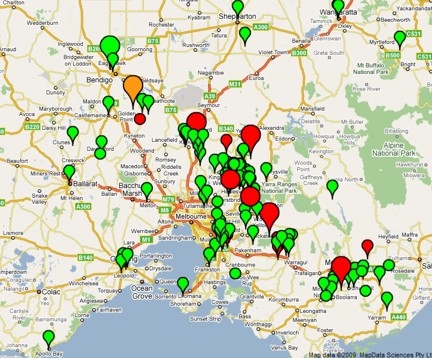
Google provided a map updated in real-time with information about the number, type and size of fires in a particular location.

firesmap

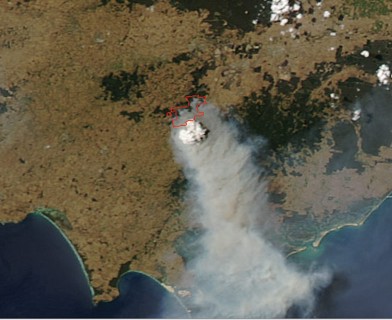
NASA provided satellite images of the fires:

satellitefires

Personally, I found Twitter’s ‘bushfires’ – tagged tweets a mix of informative and disturbing, bringing up real-time information in the most personal way, mixing facts with personal appeals for lost family. The steady Twitter stream of contributions from people all over provided communication in a way that no other media could match.

Interesting to observe that Prime Minister Kevin Rudd also communicate via Twitter.

kevinrudd

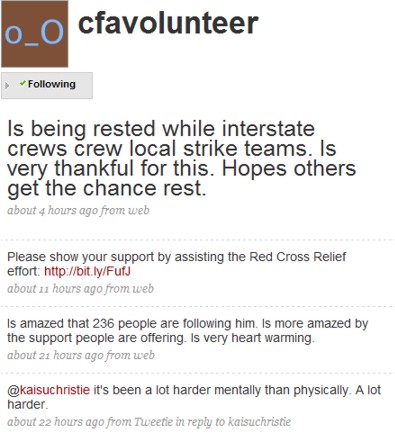
For me, the most striking aspect of this form of social media is the human element. The article mentions the twitter account of a CFA volunteer, cfafirefighter . Follow this and you follow the man, his movements, his thoughts and his feelings.

cfatwitter

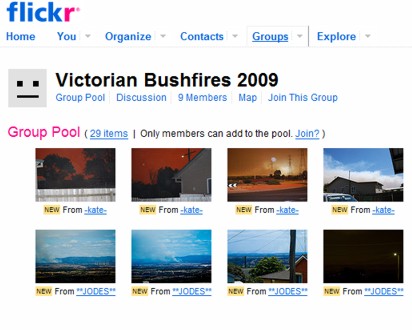
Flickr also demonstrates a platform for communication, a place for people to share images of the fires, for example, the group Victorian bushfires 2009

flickrfires

There is a very large number of photos here, and this is only one of the groups. Compare this to the few images chosen for the front page of the newspaper articles.

uploaded to Flickr by Monkeybizness February 9 2009

uploaded to Flickr by Hickey/Scott February 8 2009

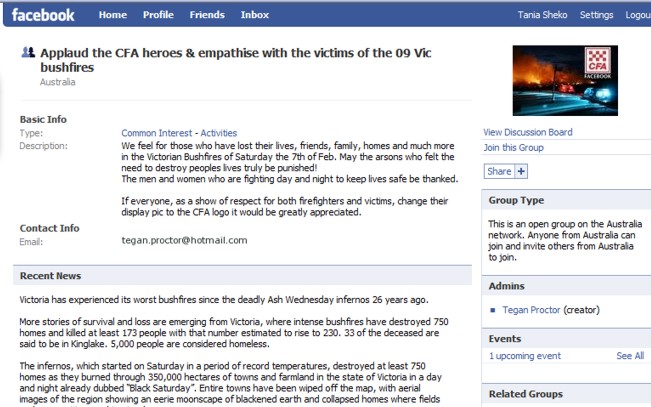
Facebook groups have sprung up too. Although it may seem to be a futile exercise joining such a group since it doesn’t necessarily lead to action, the opportunity for solidarity online may just be the impetus for worthwhile deeds.

facebookfires


The Facebook group provides links to important numbers and websites.

IMPORTANT NUMBERS AND WEBSITES:

Wildlife Rescue – http://www.wildlifevictoria.org.au/cms/index.php

Gippsland Emergency Relief
Fund – http://relieffund.org.au/

CFA bushfire hotline – 1800 240 667, http://www.cfa.vic.gov.au

State Emergency Service – 132 500

State Inquiries Centre – 1800 727 077

Other information includes different ways to donate money, for example:

http://www.salvationarmy.org.au/SALV/NEWSRELESE/PC_62630.html
Myer will match dollar-for-dollar total customer contributions to the Appeal up to $500,000. The goal – to raise $1 million for the recovery effort.

The discussion board is testimony to many a community’s empathy, willingness to help and grief:

Tarita Conza wrote
at 8:35pm
R.I.P Raye Wynette (Lane) Carter 13/05/1940 – 07/02/2009
CFA Volunter, Great grandmother of Kyla Lawrence, loving Nan of Aaron Lawrence & special friend of Tarita Conza. Tragically taken too soon! trying to save your cherished goats. You will be sadly missed but greatly remembered, Love always and forever.
So, you thought that social media was just fun and games?
Thanks to Sue Tapp for the link on Twitter to the online article.
Sue has just informed me of the ABC bushfires emergency blog.

Shahi – A visual dictionary

Have you noticed that the world is becoming increasingly visual? Well, that’s OK with me because I actually understand things better when text is accompanied with images. I’m sure I’m not the only one. In the learning realm, images – either still or moving – aid and enhance textual presentation: photos, maps, film, video clip, images on websites, visual search engines – and now a visual dictionary: Shahi.

Shahi is a visual dictionary that combines Wiktionary content with Flickr images, and more!

What I like about Shahi is the different perspectives you get from the same word. Let’s take the example ‘racism’. Here is one of the results; I like the humour and originality:

The word ‘dangerous’ yielded these results amongst others:

and this:

Definitely not what I expected!

Thought I’d try a verb – collaborate:

Never know what you’ll find.

As a teacher librarian I’m thinking of collecting images to go with fiction genres. Here’s fantasy:

What about crime?

A metaphorical meaning: photography is not a crime

Classroom possibilities beg to be discovered! Comparison of different interpretations of the same picture, guessing games, inspiration for students’ own images to accompany words, springboard for creative writing, collaborative slide presentations on a theme or message, and so on.

Thanks to Amanda for sharing this.

By the way, this reminds me of a post from a while ago,  A picture’s worth a thousand words.

Guggenheim 2.0

The Guggenheim Museum in NY has a great little online event going which encourages interaction and collective thought around some of its collection. 

Catherine Opie is an American artist specialising in issues around documentary photography.

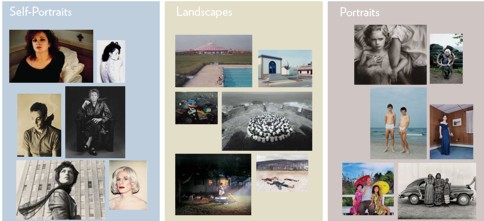
For this exhibition, Catherine Opie has selected images from the Guggenheim Museum’s photography collection and organized them into three sections: Self-Portraits, Landscapes, and Portraits. Visitors can write responses to the questions Opie poses about them and read other people’s responses.

Here are some more details from the Guggenheim Museum website:

September 26, 2008–January 7, 2009
While celebrated for her role behind the camera, Catherine Opie remains acutely aware of the voices of her subjects, and the diverse readings all images engender. Exploring this circuit of interpretation, Opie has selected images from the Guggenheim Museum’s photography collection to present alongside questions about the works’ themes and meanings, inviting museum visitors to respond with stories of their own.

People can participate online by writing about a photograph or reading other people’s comments.

guggenheimThe

I clicked on one of the portraits.

3infrontofcar

 These are the questions asked about the portraits:

What do you think makes a portrait interesting?

  • How do the titles of these photographs make you think differently about the people they portray?
  • Some of these images are made spontaneously while others are carefully staged by the artist. How does this difference in approach affect your response?

Here is one of the responses:

An interesting portrait to me is one that represents people honestly. Not only is it usually aesthetically pleasing, but it also is educational and interesting. In Keita’s photo of 3 women, she presents them in their usual daily clothing, telling the viewer something about their environment and status, and then the juxtaposition of the car brings to mind a completely different world or environment. The two together represent a very real albeit somewhat staged composition that’s intriguing and interesting.

I was excited to find this, and I’d like to keep up with the many innovative programs and ideas coming out of cultural institutions such as museums. The idea of  an artist selecting images from the collection is a creative way to bring out to more people what would normally remain within the walls of the museum, and perhaps not be accessed by as many otherwise. The addition of the questions and options to comment is added value,  inviting interaction and the sharing of opinions. I also like the fact that, whereas people would normally just look at the photos at an exhibition, maybe read a little about them, in this case the public is invited to express their impressions and opinions.

I was a little disappointed that only one or two responses were accessible, unless I’m missing something. I was looking forward to a real discussion and debate around the photos.

Nevertheless, an inspiring concept. This would be an excellent way to initiate discussion and reflection in the art classroom.

Newsmap – attractive news

newsmap

What is Newsmap?

Newsmap is an application that visually reflects the constantly changing landscape of the Google News news aggregator. A treemap visualization algorithm helps display the enormous amount of information gathered by the aggregator. Treemaps are traditionally space-constrained visualizations of information. Newsmap’s objective takes that goal a step further and provides a tool to divide information into quickly recognizable bands which, when presented together, reveal underlying patterns in news reporting across cultures and within news segments in constant change around the globe.
Newsmap does not pretend to replace the googlenews aggregator. Its objective is to simply demonstrate visually the relationships between data and the unseen patterns in news media. It is not thought to display an unbiased view of the news; on the contrary, it is thought to ironically accentuate the bias of it.

So, in a way, Newsmap is an interpretation of the news, allowing patterns and biases to be visualised.

I think this needs to be viewed over time to get a feel for it. Meanwhile, it stands out as being a very attractive way to get world news.

Has anyone explored Newsmap? What are your thoughts?