Category Archives: technology

Networking is working for some in the classroom

Photo by Thiyaga on Flickr

In his post The added value of networking, Will Richardson quotes Greenhow in a Harvard Graduate School of Education magazine editorial entitled “Thanks for the Add. Now Help Me with my Homework.” , who says that the kind of skills students are developing on social networking sites are the very same 21st century skills that educators have identified as important for the next generation of knowledge  —  empathy, appreciation for diversity of viewpoints, and an ability to multitask and collaborate with peers on complex projects’.

And yet skills are not the kind of thing that most people would expect to associate with Facebook or MySpace. Online socialising, maybe, wasting time, perhaps, collection of  too many ‘friends’ who couldn’t possibly be real friends, definitely, and what about inappropriate language and photos?  Isn’t this how most responsible people view social networking?

Surprisingly for many, and difficult to believe for most, is the fact that social networking has opened up a range of much more interesting possibilities for young people. Will quotes Greenhow saying that

most students use the medium to reach out to their peers for emotional support and as a way to develop self-esteem. One student created a video of his intramural soccer team to entice his friends to come to his games. Another created an online radio show to express his opinions, then used Facebook to promote a URL where friends could stream it live, and then used one of Facebook’s add-in applications to create a fan site for the show.

Recently our Head of English has decided to use Facebook to engage our year 12 boys in a discussion of their texts, as well as provide a platform for general questions about English skills. I’ve mentioned this in a previous post. What a brilliant idea! The boys are already on Facebook in their free time, so why not use the groups application in Facebook? What has ensued is an intelligent and stimulating collaborative discussion, in which the teacher comes in to stimulate discussion and answer questions only inasmuch as all this hasn’t been taken care of by the boys. There’s something to be said for this kind of discussion where everyone can comment, taking their time to think, not being interrupted or intimidated by others, or being able to re-read comments for clarification and review.

The Facebook project obviously had to go through the correct procedures before starting, eg. parent approval, and presentation and justification to the principal. This process is a good way to inform the school community, as well as clarify the teacher’s own reasons to support teaching and learning.

The relationship between the teacher and the boys would be strengthened, I imagine, following the Facebook group project. A teacher coming across to the students’ preferred way of communicating could only be seen as positive. The tone of the conversation is friendly, open, encouraging and often spiced with humour. The divide between teacher and student is diminished, as the teacher becomes more approachable. I think students would also appreciate the fact that the teacher is taking the time to interact with them after hours.

I only wish that somehow parents could see the valuable conversation that is taking place, so that they would understand the value of such a project, but I doubt that these students would enjoy their parents having access to their Facebook accounts!

What were those networking skills again? Empathy, appreciation for diversity of viewpoints, and an ability to multitask and collaborate with peers on complex projects. Students supporting and encouraging each other; learning to respect others’ viewpoints, working together to explore ideas and understandings. Not bad skills for life…


Web 4.0 thanks to GE

One thing leads to another. That happened to me today as it happens so often. The pathways within social networks are as mysterious as they are surprising. I was checking my Twitter updates, and I did what I often do – check out who else is interesting through my own network. So I was checking out @art4change who was conversing with @hrheingold, and I followed a link she had tweeted. I was hoping it would be good, because she had promised: ‘Watch this NOW. Dead serious. It will blow your mind. Thanks @JohnStauffer http://tinyurl.com/cydomk’.

This comes from GE. As John Stauffer says in his post ‘Hangin with Mr Cooper’,

Sit back and prepare to be amazed. No video editing was done to create this, just a flipcam and some Friday afternoon brainstorming with our Creative Director, Robert Cooper….

[youtube=http://www.youtube.com/watch?v=DkqtklABgGQ&eurl=http://blog.ogilvypr.com/2009/02/hangin-with-mr-cooper/comment-page-1/#comment-35235&feature=player_embedded]

Kissing, the pavement and squashing heads on Flickr

I think I’m in Flickr phase. I’ve had my Blue Period, and now I’m in the middle of my Flickr Period.

Today’s obsession will focus on Groups. There are so many interesting, sometimes strange, and varied groups on Flickr. I’ll give you some examples:

Beautiful Kiss

The pavement

Photo by splintered

Prints of darkness  A place where darkness comes to light, a place for smart photos that aren’t too bright…

Photo by Prudencebrown121
Vanishing beauty  As my father would say, “old things, falling down”

Photo by suspiciousminds
In numerical order  In Numerical Order, photographs are posted to the Group in numerical order.

Photo by vin60
Film noir mood  ;

Photo by Sanchi Saez Agurto

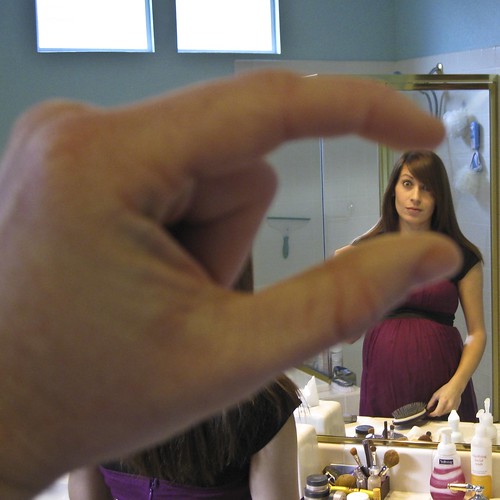
I crush your head “Inspired by Kids in the Hall, these will be pix where you take your fingers and squish the head of someone else.”

Photo by Jeff the Trojan

Social documentary photography A place for professional documentary photographers to discuss emerging technology, marketing and the impossible act of making a living through photography.

Photo by Andrew.David
Visit the world travel guide

Photo by Quejaytee

Gossamer glimpse  “this group is intended to showcase photos of (and through) transparent stuff. delicate fabrics, screens, dirty windows and other such veils will ideally fill our photos’ frames.”

Photo by ratsbeyfus
The secret life of plants 

Photo by Sammie Lynne

Graves, tombs and cemeteries

Photo by njpara31

Flickr fan art   “or any kind of artwork featuring the letters ‘F-L-I-C-K-R'”

Photo by alleluja

Macro photography

Photo by jamesdunbar42

Rural decay  Rural Decay, Pictures of Barns, Silos, Farms and other Rural buildings decaying.

Photo by Mattreynolds

Green is beautiful   

Photo by Peter Hajas

Tell a story in 5 frames

Photo by Robx

Colour and colours 

Photo by edi.peck

Whatever the weather  picures of cloud formations, weather patterns, rough seas, etc.

Photo by johnstravel

Altered signs 

Photo by _kriebel_

Apart from wasting (no! it’s not wasting; but it does eat up time) on these quirky little groups, I do believe that a little ingenuity in conjunction with these groups will lead to some interesting classroom projects.

Some of them leap out –  Tell a story in 5 frames

There’s no need for me to spell out the possibilities for an enjoyable project involving choice, creativity, visual literacy, storytelling skills, etc.

What about Rural decay  or Flickr fan art for art students?

Lots of photography ideas for sure. And don’t disregard the quirky ones, eg.

In numerical order and I crush your head.

There are many more groups and definitely many more ideas to be gleaned from these groups. What are your ideas?

Shakespeare on Facebook

[scribd id=4907297 key=key-10nxnctst7rgc6yw9e62]

This made me laugh. Some of my favourite Hamlet statuses:

Hamlet wonders if he should continue to exist. Or not.
Hamlet added England to the Places I’ve been application.
Ophelia loves flowers. Flowers, flowers, flowers. Oh look, a river.

I wonder if other versions exist. This could be a creative writing idea. You actually do need to know about the play to be able to write the statuses.

Photo courtesy of Sakypaky on Flickr


Our Head English teacher is using Facebook in the hope that it will allow boys who don’t usually contribute in class to have a voice in front of their peers. How do you explain to cynics your choice of Facebook as a platform for learning?

Adolescents have moved to Facebook for networking and communication. I’ve become a Facebook addict myself. One of its offerings is a non-threatening form of communication with a potentially large group. Another is the satisfaction of belonging to a group. It’s more accepting and democratic than face-to-face interaction – it doesn’t judge you by your appearance, age or abilities. You can choose your own hours. You can stand back and observe, or you can jump in and lend your voice.

Transfer all this to a learning environment, and you have a potentially brilliant scenario. Those who are slower to respond to discussion will not be pushed out. There’s time to think, respond, edit. The teacher can set the stage and then creep back to give control to the students. Hopefully, students will feel more comfortable to ask questions, give suggestions.

Those of you who’ve been reading my blog will know that I believe we should use technology and social media in creative ways to facilitate learning and engage students. Not for its own sake, and never without good reason. Recently my webpage on the school library intranet has evolved into a blog ‘What’s new in fiction?’ I’m so over people saying things like ‘Oooh, a blog! You’re really into all that technology stuff!. Well, no… I’m not. I’m not into it. I’m just looking at what possibilities it has for engaged and creative learning and teaching. Here is a list of things I appreciate about the fiction blog when talking to classes about books and reading:

It evolves nicely; each post introduces a new book, author, series, etc.
I can use casual, relaxed language, with even some humour
I can include pictures (book covers, author photos, etc.) and videos (book or film trailers, interviews, etc.)
Colour, font size, layout make a difference
I can include links to author and series websites, transcripts, extracts, maps, etc.
There is choice in what the students read, how much, when, etc. Compare that to a teacher’s talk;
Authors become real people as students link to interviews, blogs that reveal everyday chat or writing processes, weaknesses, personality, background, musical tastes, etc.

(OK, the above points are not unique to blogs)
Here come the blog-specific points:

The students read and write comments, ranging from the non-threatening two-word comment, to the more elaborate or passionate response;

Reading peer comments is more satisfying than listening to teachers’ views (hence Facebook idea);

Other people in the school community can write a post or book review, eg. non-librarians (leading the students to the realisation that it’s not just librarians who read, and that reading is ipso facto not solely a librarian’s past-time;

These other people could be students of all ages, teachers, teachers who wouldn’t normally be associated with reading by students (don’t take offense, but I’m thinking sport teachers, science and maths teachers, male teachers…)

The combination of different readers, each with their own reading preferences, their own way of writing, provides students with a kaleidoscopic view of what’s interesting to read;

Students take ownership of the blog by writing or commenting, by suggesting content, and the school community becomes involved in what was previously a librarian’s domain.

Reading is actually discussing, arguing, agreeing and disagreeing, thinking, wondering, escaping; and you know all this because of the discussion;

Reading becomes collective, cool, broader (you realise that tastes vary greatly and it’s okay to have your preferences; reading can be student-directed and even fun.

What I regret is that my fiction blog is a closed blog on the school intranet. It serves its purpose, but misses out on further possibilities and connections.

What are your views about using Web 2.0 tools like blogs and Facebook in teaching and learning?

I’m not good at maths but I could be

googleearthlessons


As I’ve said already, I’m not good at maths but I think I could be. I get the feeling that my learning style wasn’t catered for in the maths classroom. Something like Real World Math might have done the trick.

What a great way to take maths out of the textbook and into the real wide world. Google Earth’s satellite views of the earth and the interactive 3D environment allow users to add placemarks, annotations, photos and models, as well as measure distances and draw paths.

Within this site you will find lesson ideas, examples, and downloads for mathematics that embrace active learning, constructivism, and project-based learning while remaining true to the standards.  The initial focus will be for grades 5 and up, but teachers of younger students may be able to find some uses or inspiration from the site.  Higher level thinking skills, such as analysis, synthesis, and creativity are encouraged as well as technology skills and social learning.  The scope of this site is mathematics, but many lessons lend themselves to interdisciplinary activities also. 

 Higher level thinking skills, creativity, technology, social learning, and potential for interdisciplinary activities! Just what we need for our students today.

The site has separate areas: the Lessons page; the Community page; the Update page; and the Resource page.

The Lessons are grouped into 4 categories: Concept Lessons, Project-Based Learning, Exploratory, and Measurement.

The Community page is a strong point enabling collaboration and communication amongst users. In my opinion, that’s the drawcard of technology in education.

The other two pages are self-explanatory.

Thomas J. Petra, the author of the site, says this:

Math teachers are always searching for meaningful, practical math lessons that engage their students.  I hope this site is useful to you and that your students learn real world math.computingwithscientificnotation

 An example of a lesson is ‘Computing with scientific notation’; here’s an extract of the instructions:


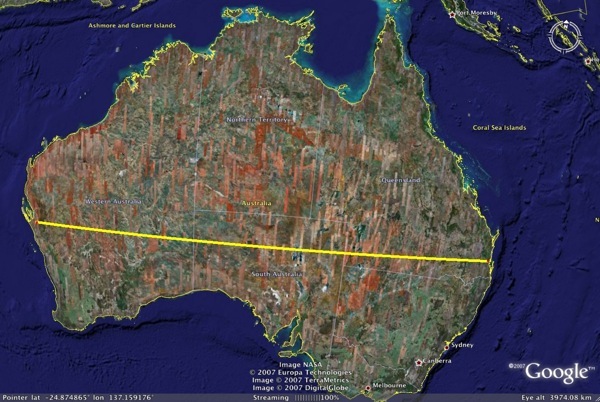
How long would it take to walk across Australia?  This lesson enables students to jump, walk, and crawl around the world without breaking a sweat.  The featured concept of this lesson is computing with scientific notation, but it also involves the distance formula, and measurement. 

In the left-hand navigation, you’ll see concepts used and grade level, eg.

Concepts used: Scientific Notation, Measurement, Rates, Algebra, Distance formula, Problem Solving

Grade level: Grades 7-9

When I clicked on the Community page I discovered it had been moved out onto a blog due to technical difficulties. The RealWorldMath Community blog provides a place for commenting, suggestions, feedback and lesson submissions.

I’m impressed with Real World Math and think it’s a rich educational resource for mathematics. If this was on the agenda in the Maths classroom, I might even give Maths another go.


Go underwater with Google Earth 5.0

Google Earth 5.0 has 2 new features. The first allows you to go back in time. You can go back in time to compare historical imagery of buildings, and you can compare historical photos of environmental features. observing changes to the landscape of our planet. The former will be of interest to history teachers, and the latter  to science teachers who will be able to use Google Earth to show students how climate change is affecting the Earth’s surface. What better way of learning than seeing for yourself.

This new application opens up exciting possibilities. When you click on the clock icon in the Google Earth 5.0 toolbar, the historical imagery time slider will appear and allow you to change your view to older imagery.

The Google Earth site includes a video which gives one of the examples of historic imagery, showing the  transformation of sports arenas in Philadelphia.

[youtube=http://www.youtube.com/watch?v=acKMplVeY6A&eurl=http://google-latlong.blogspot.com/&feature=player_embedded]


The Google Earth blog explains its exploration underwater:

But starting today we have a much more detailed bathymetric map (the ocean floor), so you can actually drop below the surface and explore the nooks and crannies of the seafloor in 3D. While you’re there you can explore thousands of data points including videos and images of ocean life, details on the best surf spots, logs of real ocean expeditions, and much more.

From George Washington to Barack Obama

It would be remiss of me not to post something about Barack Obama’s inauguration. Not for the first time, I’ve shirked a difficult synopsis of a complex event by opting for a video.

[youtube=http://www.youtube.com/watch?v=QYrZZ68zhSs&eurl=http://www.google.com/reader/view/?utm_campaign=en&utm_source=en-ha-ww-ww-bk&utm_medium=ha&utm_term=google+r&feature=player_embedded]

Theresa McGee posted this video in her post on the The Teaching Palette. It’s an interesting visual journey through the line of American presidents.

There is a similar morphing video in one of my earlier posts.

PicLits

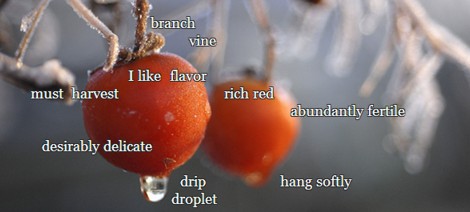
piclit-1

I thought I’d try out PicLits: inspired picture writing.

PicLits.com is a creative writing site that matches beautiful images with carefully selected keywords in order to inspire you. The object is to put the right words in the right place and the right order to capture the essence, story, and meaning of the picture.

I wasn’t that pleased with my first effort, so I tried another one.

piclit2

Well, unless I’ve missed something, the list of words is limited. Then again, I haven’t read the instructions, just had a go.  I think there’s something to be said for adding text to a picture from a limited supply. The challenge is to work with what you’ve got, thinking about the position of the words, whether you want a sparse message or story, or whether you want a more crowded and descriptive text. 

Definitely much to play with either in English, foreign language or English as a Second Language classes.

I almost forgot to thank Tom Barrett for this application, and if you go to this post you’ll find 9 other digital writing opportunities.

Winding down

2487518879_ca2e8f3642

The school year is over for me. I know that many poor souls are still fronting up until the end of this week (is there a point?) but for me it’s the long stretch ahead, the one I’ve been waiting for. Time to wind down.

It’s been a strange end to the year for me in that I missed the last 4 days, and am now recovering from spectacular oral surgery, looking less like a hamster every day, and still turning sickly shades of yellow and blue (wish I had less yellow, more blue) down my face and neck. And now that the fear of losing feeling in the lip has been put to rest, I can think about the year, looking both back in time at events and learning, and forward to next year, planning new projects for 2009.

Funny how you don’t realise the extent of change until you stop to measure it. It was only May this year that I began this blog as part of a State Library of Victoria Web 2.0 PD initiative. During the course of the following 6 or so months I’ve learned many things – lots of how-tos and bits of technology – and I’ve acquired an online presence on Facebook, Twitter and NINGs.  Most  importantly, I’ve learned what it’s like to be part of a community of learners and educators, a community that never sleeps, always on the lookout for new ways of thinking, doing and sharing.


So, winding down…

Well, actually, it’s easier said than done. I know that I’m not as tired as many teachers, having escaped report writing (as a teacher librarian), and not having the exhausting face-to-face of constant classes, and that may be one of the reasons I’m not finding the winding down easy to do. Although, I think the main reason is the feeling of excitement which comes from new discoveries, possibilities and connections. Already I’m thinking about what I want to do next year (and I’m lucky to be co-teaching with two wonderful teachers), already I’m planning new ways of doing things in class, ways of engaging and challenging students, using technologies which will inspire creativity and authentic learning. And I’m reading, reading, reading other people’s ideas and experiences.

The best thing about holidays – if you still have any energy or brain capacity left, and amongst all the Christmas and New Year bustle – is the unregimented  time for exploration. The joy of investigating new blogs,  discovering people, and making connections, branching out and connecting those connections around the world, until gradually the world starts to shrink as your map is filled with people you know  and relationships amongst these. How can you wind down when people ‘out there’ are posting great links, new ideas and articles which inspire and challenge?

Yesterday, I started looking at the Edublogs Awards 2008, and here are the categories for nomination:

1. Best individual blog

2. Best group blog

3. Best new blog

4. Best resource sharing blog

5. Most influential blog post

6. Best teacher blog

7. Best librarian / library blog

8. Best educational tech support blog

9. Best elearning / corporate education blog

10. Best educational use of audio

11. Best educational use of video / visual

12. Best educational wiki

13. Best educational use of a social networking service

14. Best educational use of a virtual world

15. Best class blog

16. Lifetime achievement

As you  browse those 16 categories, you’ll come to know a group of people you’ll admire and want to keep in touch with. These people have spent the time making transparent their learning journeys and acquired skills, not keeping these things to themselves but sharing with the world. I’m having difficulty in unwinding because there’s so much to read and enjoy!

Merry Christmas to all. Happy, safe holidays, good family and friend times, and take the time to do what nourishes you.